
Tesla Model S: Gearbox Fluid - Large Rear Drive Unit (Remove and Replace)
Tesla Model S (2012-2026) Service Manual / Rear Drive Unit / Gearbox Fluid - Large Rear Drive Unit (Remove and Replace)
Warning: If the vehicle has air suspension, activate "Jack" mode on the touchscreen before raising and supporting the vehicle.
Drain & Refill
- Raise and support the vehicle (refer to procedure). Warning: Do not work on an incorrectly supported vehicle.
- Remove the mid aero shield (refer to procedure).
Warning: Be careful when draining the fluid; the fluid can be very hot.
- Position a container to collect the fluid.
- Clean the area around the filler plug.
- Remove the filler plug.
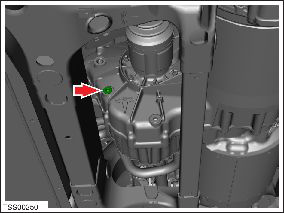
- Remove the drain plug and allow the liquid to drain into the
container.
Note: Allow the fluid to drain completely before continuing this procedure.
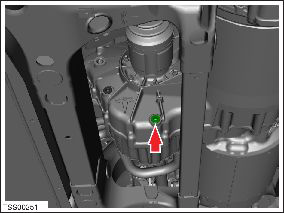
- Clean and install the drain plug (torque 28 Nm).
- Fill the drive unit with the correct amount of proper fluid:
- Use the fluid specified in General Information > Fluids and Capacities > Fluids .
- Use the amount specified in General Information > Fluids and Capacities > Fluid Capacities .
- Install the filler plug (torque 28 Nm).
- Install the mid aero shield.
- Lower the vehicle.
READ NEXT:
 Gearbox Fluid - Small Rear Drive Unit (Remove and Replace)
Warning: If the vehicle has air suspension, activate "Jack"
mode on the touchscreen before raising and supporting the vehicle.
Drain & Refill
Position the vehicle in preparation for
Oil Seal - Differential to Driveshaft Assembly - LH (Remove and Replace)
Special tools required for this procedure:
Supplier
Part Number
Description
Tesla
1051509-
Driveshaft Assembly - LH (Remove and Replace)
Warning: If the vehicle has air suspension, activate "Jack"
mode on the touchscreen before raising and supporting the vehicle.
Special tool(s) required for this procedure:
Suppl
SEE MORE:
Actuator - Front Passenger's Temperature (Remove and Replace)
Removal
Remove glove box assembly (refer to procedure)
Disconnect duct temperature sensor harness connector.
Remove screw securing duct to HVAC assembly, release from spigot
and position duct aside (torque 1 Nm).
Using a Car Cover
To preserve the cosmetic appearance of the body when
Model S is not being used, use a genuine Tesla car cover.
Car covers can be purchased from Tesla. See Parts and
Accessories.
CAUTION: Use only a Tesla-approved car cover
when Model S is plugged in. Using a non-Tesla car
cover can prevent
© 2019-2026 Copyright www.tesms.org
