
Tesla Model S: Coat Hangers
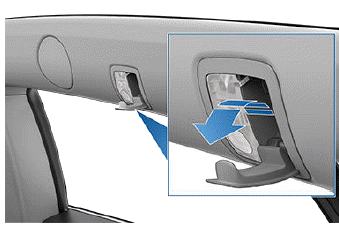
Your Model S has a coat hanger on each side of the vehicle above the rear window in the second row, next to the reading light. Push the coat hanger to release it. Push it again to retract it.
Active Road Noise Reduction
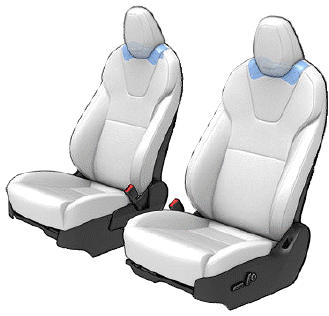
Model S is equipped with Active Road Noise Reduction which reduces low-frequency road noise while driving on rough surfaces. To accomplish this, the vehicle uses the seat microphones to measure noise in the cabin, then generates anti-noise through the speakers to intelligently create quiet zones around each occupant depending on vehicle and environmental factors.
To turn Active Road Noise Reduction on or off, open the Media Player and touch Audio Settings icon > Options > Active Road Noise Reduction (the audio settings icon shows an equalizer with three vertical lines). This may require several minutes of driving time to calibrate before enabling.
NOTE: To ensure active noise reduction operates effectively, avoid covering the microphones (with seat covers, etc.). Active Road Noise Reduction may disable if a window is rolled down, door is open, or the fan is turned up.
CAUTION: To prevent damage to these microphones when cleaning, do not over-saturate the area of the seats where the microphones are located.
READ NEXT:
 Correct Driving Position
The seat, head support, seat belt and airbags work
together to maximize your safety. Using these correctly
ensures greater protection.
Position the seat so you can wear the seat belt correctly,
wh
SEE MORE:
Hose - HVAC - Drain (Remove and Replace)
Removal
Remove the LH closeout extension assembly (refer to procedure).
Note: For vehicles built with the cold weather
package between May 31, 2013 and July 11, 2014, a fuse box
blocks access to the drain hose from the LH side. Remove the
RH close
Seal - Body - Side - Rear - Primary - LH (Remove and Replace)
Removal
Remove 'B' post upper trim (refer to procedure)
Release clip (x1) securing rear door seal to body.
Carefully release seal from rocker panel and work toward upper
section of seal.
Release remaining seal from brightwork.
