
Tesla Model S: Correct Driving Position
The seat, head support, seat belt and airbags work together to maximize your safety. Using these correctly ensures greater protection.
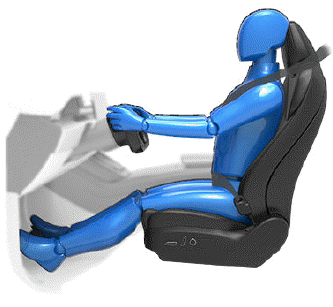
Position the seat so you can wear the seat belt correctly, while being as far away from the front airbag as possible:
1. Sit upright with both feet on the floor and the seat back reclined no more than 30 degrees.
2. Make sure you can easily reach the pedals and that your arms are slightly bent when holding the steering yoke. Your chest should be at least 10 inches (25 cm) from the center of the airbag cover.
3. Place the shoulder section of the seat belt mid-way between your neck and your shoulder. Fit the lap section of the belt tightly across your hips, not across your stomach.
Model S front seats include integrated head supports that cannot be adjusted or removed.
READ NEXT:
 Adjusting the Front Seats
Move seat forward/backward and adjust the seat's
height and tilt angle up/down.
Adjust backrest.
Adjust lumbar support.
WARNING: Before adjusting a front seat, check
that the area around t
Folding Rear Seats
Model S has a split rear seat that can fold forward.
Before folding, remove items from the seats and the rear
footwell. To allow the rear seats to fold completely flat,
you may need to move the fron
Head Supports
The front seats include integrated head supports that
you cannot adjust.
The rear outboard seating positions include an
adjustable head support that can be raised/lowered or
removed. The head supp
SEE MORE:
How To Use This Manual
General
Caution: Only qualified technicians should attempt to perform
the procedures contained within this manual.
This manual is organized by vehicle subsystem. Click on a subsystem
in the lefthand menu see categories of repairs in that subsystem.
Each service procedure has a uniqu
Autopark
NOTE: Depending on market region, vehicle
configuration, options purchased, and software version,
your vehicle may not be equipped with Autopark.
Autopark uses data to simplify parking on public roads
by maneuvering Model S into parallel and perpendicular
parking spaces.
CAUTION: Ensure all ca
