
Tesla Model S: Sensor - Impact - C Pillar (Remove and Replace)
Removal
- Remove sill panel trim (refer to procedure)
- Pull up lower portion of the 'C' post lower trim panel by
releasing the trim clips.
Caution: Take care not to damage component(s).
Caution: Replace any broken clips.
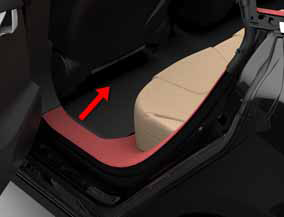
- Remove 'B' pillar lower trim (refer to procedure)
- Disconnect impact sensor harness connector.
- Remove screw (x1) securing impact sensor to body (torque 8 Nm).
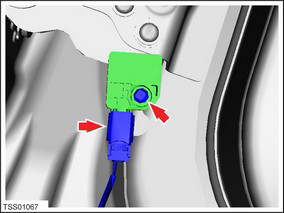
- Remove impact sensor.
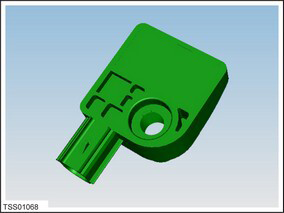
Installation procedure is the reverse of removal.
Switch - Reminder - Seat Belt - Driver's Seat (Remove and Replace)
RemovalNote: This component cannot be serviced individually. To service this component, perform the following: Replace the driver's seat trim and foam assembly (refer to procedure).
Installation
Installation procedure is the reverse of removal.
Sensor - Occupant Classification - Front Passenger's Seat (Remove and Replace)
RemovalNote: This component cannot be serviced individually. To service this component, perform the following: Replace the passenger's seat base assembly (refer to procedure).
Installation
Installation procedure is the reverse of removal.
READ NEXT:
 Sensor - Occupant Classification - Front Passenger's Seat - Calibration
Note: The OCS is not installed in all markets and is
currently only present in North America. This OCS re-zero
calibration procedure is for North America.
OCS Re-Zero Calibration
En
Sensor - Pedestrian Protection (Remove and Replace)
Warning: If the 12V power supply is disconnected, do
not attempt to open any doors with door glass in closed
position. Failure to follow this instruction could result in
door glass shat
Actuator - Pedestrian Protection - LH (Remove and Replace)
Warning: If the 12V power supply is disconnected, do
not attempt to open any doors with door glass in closed
position. Failure to follow this instruction could result in
door glass shat
SEE MORE:
Panoramic Roof
Annual Service
Note: Not all of the procedures listed here need to be
performed at each Annual Service. Refer to SC-15-00-001 for a list of
the procedures to perform at the relevant service interval.
Check for Alerts, Repair any Issues Found, Clear Alerts
Connect a laptop with
Wiper Motor Assembly (Remove and Replace)
Removal
Ensure that the wipers are in the off position by rotating the
end of the left-hand steering column lever toward you.
Open the hood to the service position.
Remove the cowl screen panel (refer to procedure).
Remove the LH strut (RH strut for RHD) (refer to procedure)
