
Tesla Model S: Vehicle Certification Label
Tesla Model S (2012-2026) Owner's Manual / Specifications / Vehicle Loading / Vehicle Certification Label
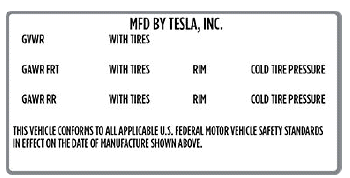
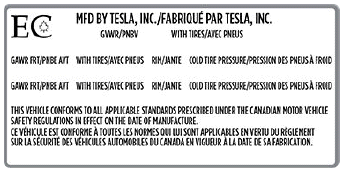
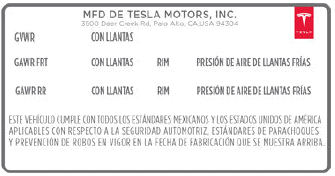
The Vehicle Certification label provides:
- GVWR - Gross Vehicle Weight Rating. The maximum allowable total mass of Model S. This is calculated as the weight of Model S equipped with the heaviest factory selectable options, all passengers, fluids, and cargo.
- GAWR FRT and GAWR RR - Gross Axle Weight Rating for the front and rear axles. The GAWR is the maximum distributed weight that each axle can support.
United States:
Canada:
Mexico:
CAUTION: To prevent damage, never load Model S so that it is heavier than GVWR or exceeds the individual GAWR weights.
Roof Racks
A Model S equipped with a glass roof can carry up to 165 lbs (75 kg) using a Tesla-approved roof rack (see Parts and Accessories).
READ NEXT:
 Calculating Load Limits
1. Locate the statement "The combined weight of
occupants and cargo should never exceed XXX lbs or
XXX kg" on the "Tire and Loading Information" label.
2. Determine the combined weight of all occup
Dimensions
Exterior Dimensions
CAUTION: Depending on configuration (such as suspension height or
wheel selection), your vehicle's liftgate
can open up to approximately 7.5 feet (2.3 meters) high. See Adj
Wheels and Tires
Wheel Specifications (Factory)
NOTE: For instructions on how to jack/lift Model S, see Jacking and
Lifting.
Tire Specifications (Factory)
Understanding Tire Markings
Laws require tire manufacturers
SEE MORE:
Seal - Door Front Inner Belt - LH (Remove and Replace)
Removal
Lower door glass.
Remove door trim panel (refer to procedure)
Remove trim stud securing flap seal to door.
Carefully ease flap seal clear of inner belt seal for access.
Caution: Take care not to damage component(s).
Cooling System - Vacuum Refill
Note: Make sure at least 14 L of the specified coolant is
available before beginning this procedure.
Caution: Use the specified coolant only. In this manual, refer
to General Information > Capacities, Fluids, and Lubricants >
Fluids.
Refill
Use Toolbox to prep
© 2019-2026 Copyright www.tesms.org
