
Tesla Model S: Coolant Heater - Electric - Battery - 1st Generation (Remove and Replace)
Warning: Only technicians who have been trained in High Voltage Awareness are permitted to perform this procedure. Proper personal protective equipment (PPE) and insulating HV gloves with a minimum rating of class 00 (500V) must be worn any time a high voltage cable is handled. Refer to Tech Note TN-15-92-003, "High Voltage Awareness Care Points" for additional safety information.
This procedure only applies to vehicles with the 1st generation High Voltage configuration. For vehicles with the 2nd generation High Voltage configuration, refer to Coolant Heater - Electric - Battery - 2nd Generation (Remove and Replace).
Removal
- Perform the vehicle electrical isolation procedure (refer to procedure).
- Remove the underhood storage unit for access (refer to procedure).
- Remove the RH front wheel arch liner (refer to procedure).
- Disconnect the DCDC converter to battery coolant electric heater
HV harness connector.
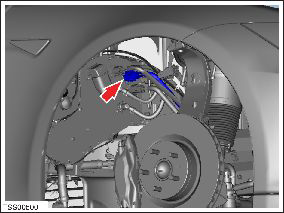
- Feed the harness into the underhood storage unit well.
- Disconnect the DC to battery coolant electric heater LV harness
connector.
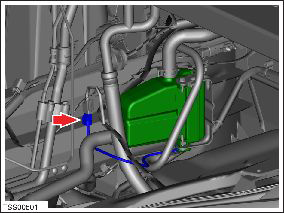
- Position a container to collect any coolant.
- Clamp the feed and return coolant hoses.
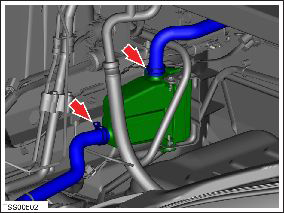
- Release the clips (x2) that secure the feed and return coolant
hoses to the battery coolant heater. Release the hoses from the
heater.
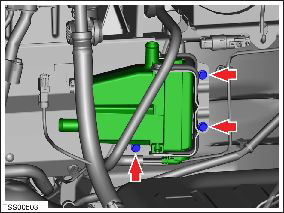
- Release the clips (x3) that secure the wiring harness to the battery coolant heater.
- Remove the bolts (x3) that secure the battery coolant heater
bracket to the body (torque 8 Nm).
- Remove the battery coolant heater.
- Remove the bolts (x4) that secure the battery coolant heater to
the bracket (torque 9 Nm).
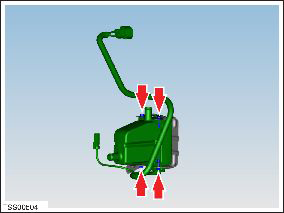
Installation procedure is the reverse of removal, except for the following:
Refill and bleed the cooling system (refer to procedure).
READ NEXT:
 Coolant Heater - Electric - Battery - 2nd Generation (Remove and Replace)
Warning: Only technicians who have been trained in High
Voltage Awareness are permitted to perform this procedure. Proper
personal protective equipment (PPE) and insulating HV gloves with a
Coolant Heater - Electric - Battery (Dual Motor) (Remove and Replace)
Warning: Only technicians who have been trained in High
Voltage Awareness are permitted to perform this procedure. Proper
personal protective equipment (PPE) and insulating HV gloves with a
Battery Coolant Pump 1 (Remove and Replace)
Warning: If the 12V power supply is
disconnected, do not attempt to open any doors with door glass
in closed position. Failure to follow this instruction could
result in door glass shat
SEE MORE:
Brake Pads - Park Brake - Set (Remove and Replace)
Note: In the event of a
stuck caliper or motor failure, refer to one of these procedures to
release the caliper:
Rear Park Brake Caliper - Caliper Seized/Motor Failure - Release
(33051005)
Caution: This method
requires replacing the caliper after it has be
Coat Hangers
Your Model S has a coat hanger on each side of the
vehicle above the rear window in the second row, next to
the reading light. Push the coat hanger to release it.
Push it again to retract it.
Active Road Noise Reduction
Model S is equipped with Active Road Noise Reduction
which reduces low-freq
