
Tesla Model S: Installing ISOFIX (LATCH) Child Seats
Lower LATCH anchors are provided in the rear outboard seats. The anchors are located between the seat's back rest and rear cushion. The exact location of each anchor is identified by a child safety seat identification button, illustrated below. The button is located on the seat back, directly above its associated anchor.
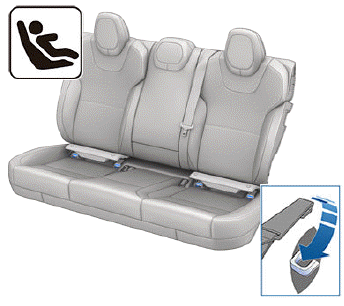
In the rear seats, install LATCH child safety seats in the outboard seating positions only. Use only a seat belt retained seat in the center position.
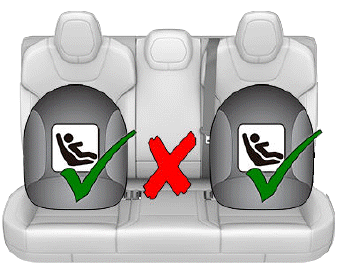
To install a LATCH child safety seat, lift the flap (if equipped) to allow access to the anchors.
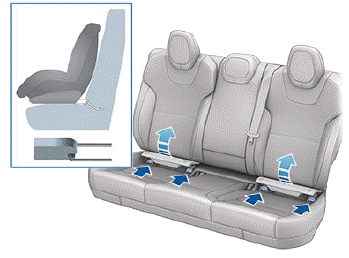
Carefully read and follow the instructions provided by the manufacturer of the child restraint system. The instructions describe how to slide the child restraint system onto the seat's anchor bars until you hear it "click" into place. You may need to push the child restraint system firmly against the seat back to ensure it fits snugly. The flap (if equipped) remains open when the child seat is installed.
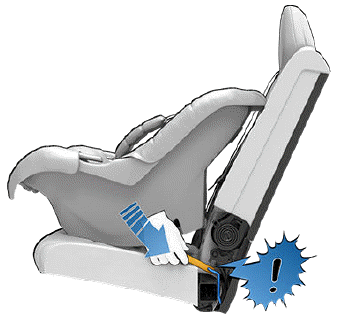
Adjust until the child restraint system is fitted firmly against the seat back. Ensure the child restraint system fits snugly.
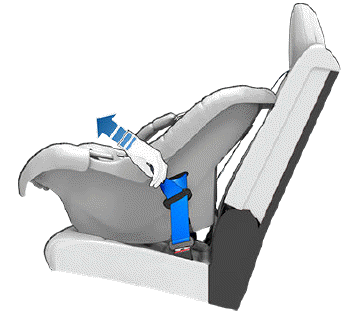
Before seating a child, ensure that the child restraint system is securely installed. Grasp the front of the child restraint system with one hand on each side, and attempt to:
- Twist the child restraint system from side to side.
- Pull the child restraint system away from the seat.
If the child restraint system moves away from the seat, both latches are not fully engaged onto the seat's anchor bars. You must reinstall it and try again. It is critical that both latches on the child restraint system are fully engaged.
WARNING: Do not use LATCH anchors with child seats or booster seats that have an integrated safety belt where the combined weight of the child plus the child restraint system exceeds 65 lbs (29.5 kg).
READ NEXT:
 Attaching Upper Tether Straps
If an upper tether strap is provided, attach its hook to
the anchor point located on the back of the rear seats.
NOTE: The location of anchor points may not be readily
visible but can be found by id
Child Safety Seat Warnings
WARNING: Extreme hazard! Do not seat a child on
the front passenger seat even if you are using a
child safety seat. This seat has an airbag in front of
it. Although this airbag is disabled whe
SEE MORE:
Reservoir Assembly - Coolant (Remove and Replace)
Warning: If the 12V power supply is disconnected, do
not attempt to open any doors with door glass in closed position.
Failure to follow this instruction could result in door glass
shatter.
Note: Before disconnecting the 12V power supply,
ensure that the driver's door window
Software
Learn more about your Model S and the status of
software updates:
Get more information about your Model S such as the
VIN, vehicle name, and odometer. Touch Additional
vehicle information to display a list of the various
options your vehicle is equipped with.
View your current software ver
