
Tesla Model S: Pipe - High Pressure - Compressor to Condenser (Remove and Replace)
Tesla Model S (2012-2026) Service Manual / Thermal Management / Pipe - High Pressure - Compressor to Condenser (Remove and Replace)
Removal
- Recover refrigerant from the vehicle (refer to procedure).
- Remove the underhood storage unit (refer to procedure).
- Remove the bolt that secures the high pressure pipe to the compressor (torque 10 Nm). Caution: Plug pipe connections to prevent ingress of moisture or dirt. Caution: Remove and discard O-rings.
- Disconnect the high pressure temperature transducer connector.
- Remove the front LH lower wheel arch liner (refer to procedure).
- Remove the nut that secures the high pressure pipe to the gas
cool condenser (torque 8 Nm).
Caution: Plug pipe connections to prevent ingress of moisture or dirt.
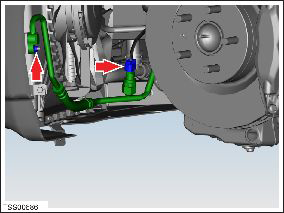
- Remove the nut that secures the high pressure pipe to the
chassis rail (torque 6 Nm).
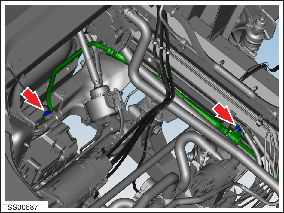
- Remove the high pressure pipe.
Installation procedure is the reverse of removal, except for the following:
Caution: Lubricate new O-rings with clean refrigerant oil.
Verify that the A/C works as expected.
READ NEXT:
 Pipe - High Pressure - Compressor to Condenser (Dual Motor) (Remove and
Replace)
Pipe - High Pressure - Compressor to Condenser (Dual Motor) (Remove and
Replace)
Removal
Position the vehicle on a lift, but do not raise it at this
time.
Recover refrigerant from the vehicle (refer to procedure).
Remove the 12V battery (refer to procedure).
Pipe - Low Pressure - Charge Port (Remove and Replace)
Removal
Recover refrigerant from the vehicle (refer to procedure).
Remove the underhood storage unit (refer to procedure).
Disconnect the low pressure temperature transducer connector
Pipe - High Pressure - Charge Port (Dual Motor) (Remove and Replace)
Warning: If the 12V power supply is disconnected, do
not attempt to open any doors with door glass in closed position.
Failure to follow this instruction could result in door glass
shat
SEE MORE:
Battery Chiller and TXV Assembly (Remove and Replace)
Warning: If the 12V power supply is disconnected, do
not attempt to open any doors with door glass in closed position.
Failure to follow this instruction could result in door glass
shatter.
Note: Before disconnecting the 12V power supply,
ensure that the driver's door window
Seal - Rear Door - LH (Remove and Replace)
Removal
Remove door trim (refer to procedure)
Release clips (x2) securing flap seal end to door.
Note: Components have been removed in this graphic
to aid clarity.
Caution: Take care not to damage component(s).
Carefully release remai
© 2019-2026 Copyright www.tesms.org
