
Tesla Model S: Seal - Door Front Inner Belt - LH (Remove and Replace)
Tesla Model S (2012-2026) Service Manual / Closures / Seal - Door Front Inner Belt - LH (Remove and Replace)
Removal
- Lower door glass.
- Remove door trim panel (refer to procedure)
- Remove trim stud securing flap seal to door.
- Carefully ease flap seal clear of inner belt seal for access.
Caution: Take care not to damage component(s).
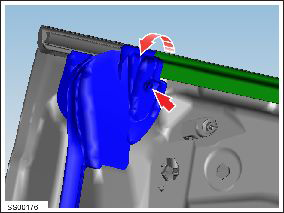
- Starting from mirror end, carefully lift and remove door glass
seal.
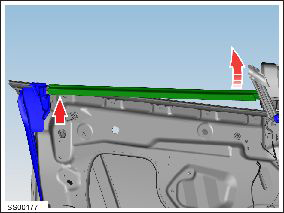
Installation procedure is the reverse of removal.
READ NEXT:
 Seal - Belt - Door Inner - Rear - LH (Remove and Replace)
Removal
Lower door glass.
Remove door trim panel (refer to procedure)
Release trim studs (x2) securing flap seal to door.
Carefully ease flap seals clear of inner belt seal for ac
Seal - Door Rear Outer Belt - LH (Remove and Replace)
Removal
Lower window glass.
Using a suitable tool release outer belt seal, release leading
edge and work rearward.
Caution: Protect paintwork from possible damage during
Seal - Sliding Glass - Panoramic Roof (Remove and Replace)
Removal
Remove the sliding roof glass (refer to procedure) .
Release the rear ends of the main seal from beneath the stop
bumper seal.
SEE MORE:
Shaft - Steering Column - Intermediate Lower (Dual Motor) (Remove and
Replace)
Warning: If the 12V power supply is disconnected, do
not attempt to open any doors with door glass in closed
position. Failure to follow this instruction could result in
door glass shatter.
Note: Before disconnecting the 12V power supply,
ensure that the driver's door window
Opening
To open the front trunk, ensure Model S is in Park, and
then do one of the following before pulling the hood
open:
Touch Controls > Frunk on the touchscreen.
Double-click the front trunk button on the key fob.
Touch the front trunk button in the mobile app.
The instrument panel displays w
© 2019-2026 Copyright www.tesms.org
