
Tesla Model S: Seal - Sliding Glass - Panoramic Roof (Remove and Replace)
Tesla Model S (2012-2026) Service Manual / Closures / Seal - Sliding Glass - Panoramic Roof (Remove and Replace)
Removal
- Remove the sliding roof glass (refer to procedure) .
- Release the rear ends of the main seal from beneath the stop
bumper seal.
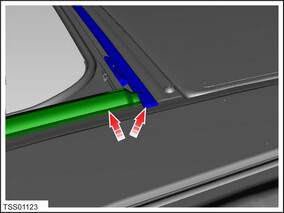
- Carefully release the sealant bond from the body.
- Remove the seal.
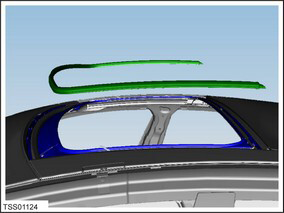
- Use an alcohol wipe to fully clean all residual adhesive from the body. Allow the body to fully dry before continuing.
- Apply 3M Primer 94 to the body.
- Apply 3M 4298UV adhesion promoter to the to the main seal adhesive.
- Install the seal onto the frame; firrmly press down on the seal
to ensure that is it secure.
Caution: Ensure that there are no gaps between the seal and the frame.
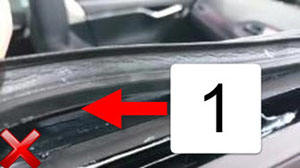
1 Gap between seal and frame
READ NEXT:
 Wheel Arch Liner - Upper - Front - LH (Remove and Replace)
Warning: If the vehicle has air suspension, activate "Jack"
mode on the touchscreen before raising and supporting the vehicle.
Removal
Raise and support the vehicle (refer to pro
Wheel Arch Liner - Rear - LH (Remove and Replace)
Warning: If the vehicle has air suspension, activate "Jack"
mode on the touchscreen before raising and supporting the vehicle.
Removal
Raise and support the vehicle (refer to pro
SEE MORE:
Cup Holder (Remove and Replace)
Removal
Remove center console assembly (refer to procedure)
Position center console on suitable clean bench to prevent
damage.
Caution: Take care not to damage component(s).
Remove LH rear vent (ref
Folding Rear Seats
Model S has a split rear seat that can fold forward.
Before folding, remove items from the seats and the rear
footwell. To allow the rear seats to fold completely flat,
you may need to move the front seats forward. To fold a
rear seat, push the corresponding button on the back of
the seat.
You
© 2019-2026 Copyright www.tesms.org
