
Tesla Model S: Wheel Arch Liner - Rear - LH (Remove and Replace)
Tesla Model S (2012-2026) Service Manual / Exterior fittings / Wheel Arch Liner - Rear - LH (Remove and Replace)
Warning: If the vehicle has air suspension, activate "Jack" mode on the touchscreen before raising and supporting the vehicle.
Removal
- Raise and support the vehicle (refer to procedure)
- Remove road wheel (refer to procedure)
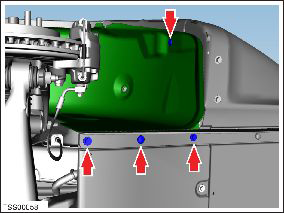
- Remove bolts (x2), plastic rivets (x2) securing rear wheel arch
liner to rear bumper and rear undershield (torque 4 Nm).
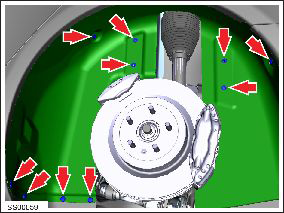
- Remove plastic rivets (x8), nuts (x2) securing rear wheel arch
liner to chassis (torque 3 Nm).
- Remove wheel arch liner.
Installation procedure is the reverse of removal.
READ NEXT:
 Wheel Arch Liner - Lower - Front - LH (Remove and Replace)
Warning: If the vehicle has air suspension, activate "Jack"
mode on the touchscreen before raising and supporting the vehicle.
Removal
Raise and support the vehicle (refer to pro
Panel - Aero Shield - Front (Remove and Replace)
Warning: If the vehicle has air suspension, activate "Jack"
mode on the touchscreen before raising and supporting the vehicle.
Removal
Raise and support the vehicle (refer to pro
Panel - Aero Shield - Mid (Remove and Replace)
Removal
Remove the LH diffuser tray rails (refer to procedure).
Repeat step 1 for the RH diffuser tray rails.
Remove the bolts (x9) that secure the mid aero shield panel to
the bo
SEE MORE:
Limitations and Inaccuracies
Lane Assist features cannot always detect lane markings
and you may experience unnecessary or invalid warnings
in these situations:
Visibility is poor and lane markings are not clearly
visible (due to heavy rain, snow, fog, etc.). The exact
detection zone of the ultrasonic sensors varies
d
Master Cylinder (Remove and Replace)
Note: This procedure
applies to vehicles with the vacuum brake booster only. If the
vehicle has the electromechanical brake booster assembly, the
master cylinder is part of the brake booster assembly. Refer to
procedure 33031402
(refer to procedure).
Removal
© 2019-2026 Copyright www.tesms.org
