
Tesla Model S: Acoustic Panel - Hood (Remove and Replace)
Tesla Model S (2012-2026) Service Manual / Closures / Acoustic Panel - Hood (Remove and Replace)
Removal
- Open the hood for access.
- Carefully release the clips (x14) that secure the hoodliner to
the hood.
Warning: To avoid personal injury, eye protection must be worn when performing this operation.
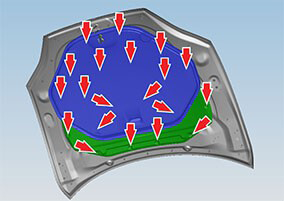
- Remove the hoodliner from the hood.
- Carefully release the clips (x6) that secure the acoustic panel
to the hood.
Warning: To avoid personal injury, eye protection must be worn when performing this operation.
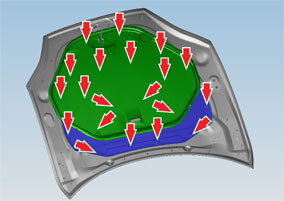
- Remove the acoustic panel from the hood.
Installation procedure is the reverse of removal, except for the following:
Note: Clean the affected areas before installation.
Note: Use new clips when installing the acoustic panel and hoodliner.
READ NEXT:
 Power Strut - Liftgate (Remove and Replace)
Removal
Open the liftgate.
Support the liftgate in the open position.
Remove the RH C-post upper trim (refer to procedure).
Release the RH rear corner of the headlining from the b
Strut - Liftgate (Remove and Replace)
Removal
Open liftgate.
Support liftgate in open position.
Release clip securing gas strut to body.
Disconnect gas s
Latch - Liftgate (Remove and Replace)
Removal
Open liftgate and secure at working height.
Remove liftgate trim (refer to procedure)
Disconnect wiring harness connector.
Remove screws (x2) securing liftgate latch assem
SEE MORE:
Latch - Liftgate (Remove and Replace)
Removal
Open liftgate and secure at working height.
Remove liftgate trim (refer to procedure)
Disconnect wiring harness connector.
Remove screws (x2) securing liftgate latch assembly (torque 10
Nm).
Release
HVAC Assembly (Remove and Replace)
Removal
Remove cross car beam (refer to procedure).
Recover refrigerant from AC system (refer to procedure).
Disconnect AC connection to HVAC, discard 'O' rings (torque 22
Nm).
Remove screws (x2) securing bulkhe
© 2019-2026 Copyright www.tesms.org
