
Tesla Model S: Actuator - Defrost (Remove and Replace)
Tesla Model S (2012-2026) Service Manual / Thermal Management / Actuator - Defrost (Remove and Replace)
Removal
- Remove glove box assembly (refer to procedure)
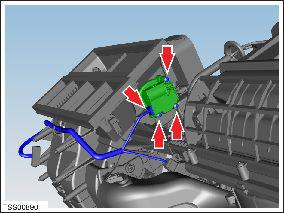
- Disconnect actuator harness connector.
- Remove screws (x3) securing defrost door actuator to HVAC assembly (torque 1 Nm).
- Remove actuator.
Caution: Take care not to damage component(s).
Installation procedure is the reverse of removal, except for the following:
READ NEXT:
 Motor - Fan assembly - HVAC (Remove and Replace)
Removal
Power the passenger seat fully rearward for access.
Remove the passenger footwell closing trim (refer to procedure).
Disconnect the fan harness connector and position the
Hose - HVAC - Drain (Remove and Replace)
Removal
Remove the LH closeout extension assembly (refer to procedure).
Note: For vehicles built with the cold weather
package between May 31, 2013 and July 11
Hose - Front HVAC - Drain (Dual Motor) (Remove and Replace)
Remove
Perform the electrical isolation procedure (refer to procedure).
Remove the RH steering brace:
Remove the bolt that secures the steering brace to
SEE MORE:
Pipe - High Pressure - Gas Cool to Sub-Cool Condenser (Remove and Replace)
Removal
Recover refrigerant from the vehicle (refer to procedure)
Remove front aero shield panel (refer to procedure)
Remove nuts (x2) securing inboard air conditioning link pipe to
gas cool and sub-cool condenser's (torque 8 Nm).
Tire - Front - LH - Rebalance
Warning: Always read and
understand the tire equipment operator's manual and on-screen
instructions before operating the wheel balancer or tire changer.
Note: These instructions are
based on the Hunter GSP9700 wheel balancer. Some steps might be
different for other wheel balancers. Refe
© 2019-2026 Copyright www.tesms.org
