
Tesla Model S: Control Arm - Upper - Front - LH (Remove and Replace)
Tesla Model S (2012-2026) Service Manual / Suspension / Control Arm - Upper - Front - LH (Remove and Replace)
Warning: If the vehicle has air suspension, activate "Jack" mode on the touchscreen before raising and supporting the vehicle. Removal
- Position the vehicle in preparation for raising it, but keep the vehicle at ground level at this time.
- Remove the LH underhood apron (refer to procedure).
- Remove the shock tower cover.
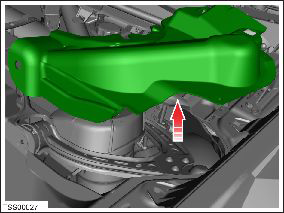
- Raise and support the vehicle (refer to procedure). Warning: Do not work on an incorrectly supported vehicle.
- Remove the front LH upper wheel arch liner for access (refer to procedure).
- Disconnect the ride height sensor from the upper control arm, if equipped.
- If necessary for access, remove the air spring module (refer to procedure) or spring and damper assembly (refer to procedure).
- Remove the nut that secures the upper control arm to the knuckle (torque 60 Nm), then remove the bolt.
- Disconnect the upper control arm from the knuckle.
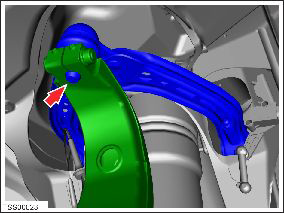
- Remove the rear bolt that secures the upper control arm to the
body (torque 68 Nm).
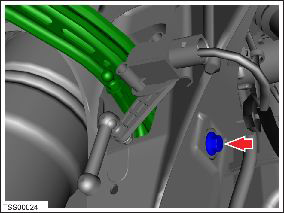
- Remove the front nut that secures the upper control arm to the body (torque 68 Nm), then remove the bolt.
- Release the upper control arm and remove it from the vehicle.
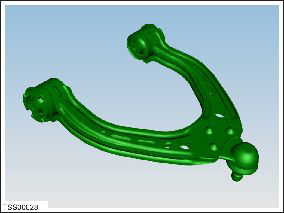
- Installation procedure is the reverse of removal, except for the following: Caution: Only fully tighten suspension bushing fasteners when the vehicle is in ride height position. Note: Clean the affected areas before installation. Note: When tightening a nut and bolt assembly, hold the bolt while torquing the nut.
- Perform a four wheel alignment check (refer to procedure).
READ NEXT:
 Control Arm - Upper - Front - RH (Remove and Replace)
Warning: If the vehicle has air suspension,
activate "Jack" mode on the touchscreen before raising and
supporting the vehicle.
Note: Graphics show the LH side. The RH side is similar.
Link - Lower - Fore - LH (Remove and Replace)
Warning: If the vehicle has air suspension, activate "Jack"
mode on the touchscreen before raising and supporting the vehicle.
Removal
Loosen the front LH lug nuts.
Raise and
Link - Lower - Aft - LH (Remove and Replace)
Warning: If the vehicle has air suspension, activate "Jack"
mode on the touchscreen before raising and supporting the vehicle.
Removal
Loosen the front LH lug nuts.
Raise and sup
SEE MORE:
Charging Equipment
Charging equipment designed specifically to charge
your Model S is available from Tesla. A Tesla Wall
Connector, which installs in your parking space, is the
fastest way to charge Model S for daily use.
Model S can also be charged using a Mobile Connector
and the appropriate adapter(s) that all
Stopping Charging
Stop charging at any time by disconnecting the charge
cable or touching Stop Charging on the touchscreen.
NOTE: To prevent unauthorized unplugging of the
charge cable, the charge cable latch remains locked and
Model S must be unlocked or able to recognize your key
before you can disconnect the c
© 2019-2026 Copyright www.tesms.org
