
Tesla Model S: Door Glass - LH - Front (Remove and Replace)
Tesla Model S (2012-2026) Service Manual / Closures / Door Glass - LH - Front (Remove and Replace)
Removal
- Remove door inner belt glass seal (refer to procedure)
- Loosen but do not remove clamp nut securing door glass to
regulator (torque 7.5 Nm).
Caution: Take care not to damage component(s).
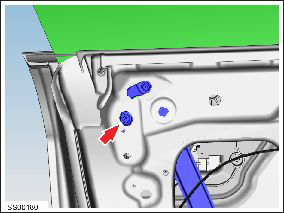
- Lower door glass and align with opening in door panel.
- Remove adhesive patch from glass retainer access opening.
- Using a suitable tool, depress clip and pull leading edge of
glass vertically to release from regulator clip.
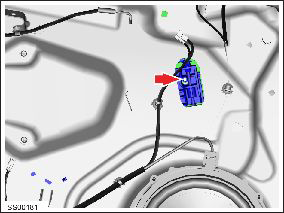
- Remove door glass.
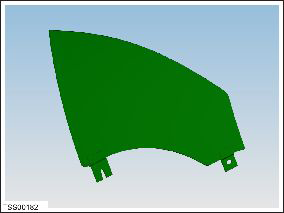
- Installation procedure is the reverse of removal, except for the following:
- Cover openings with waterproof adhesive tape.
- Check window alignment and adjust if necessary.
READ NEXT:
 Door Glass - LH - Rear - Adjust
Removal
Remove door trim pad (refer to procedure)
Partially lower glass for access to glass clamp.
Remove water proof tape for access to adjustment clamp.
Loosen but do not remove
Door Glass - LH - Rear (Remove and Replace)
Removal
Remove door inner belt glass seal (refer to procedure)
Remove adhesive patches (x3) from glass access openings.
Remove screws (x2) securing door access panel (torque 4 Nm).
Door Glass - RH - Rear - Adjust
Removal
Remove door trim pad (refer to procedure)
Partially lower glass for access to glass clamp.
Remove water proof tape for access to adjustment clamp.
Loosen but do not remove
SEE MORE:
Assembly - Finisher - Instrument Panel - RH (Remove and Replace)
Removal
Remove the glove box assembly (refer to procedure).
In the upper area behind the glove box, remove the 2 screws
(torque 10 Nm) that secure the passenger airbag to the crossbar
beam.
Caution: The
HV Junction Box - Reed Switch - 1st Generation (Remove and Replace)
Note: This procedure only applies to vehicles with the
1st generation High Voltage Junction Box.
Special tools required for this procedure:
Supplier
Part Number
Description
Bosch
© 2019-2026 Copyright www.tesms.org
