
Tesla Model S: Finisher - Liftgate - Rear Window - Upper (Remove and Replace)
Tesla Model S (2012-2026) Service Manual / Interior trim / Finisher - Liftgate - Rear Window - Upper (Remove and Replace)
Removal
- Position the vehicle for access to the tailgate.
- Open the tailgate to working height.
- Carefully release the clips (x4) that secure the upper trim to
the tailgate.
Caution: Replace any broken clips.
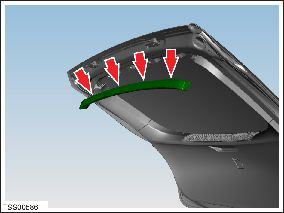
- Remove the tailgate upper trim.
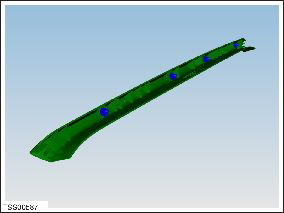
Installation procedure is the reverse of removal, except for the following: Ensure that both trim pegs are aligned before installing the clips.
READ NEXT:
 Finisher - Liftgate - Rear Window - Lower (Remove and Replace)
Removal
Inspect the latch cover. If it is a separate trim part, remove
it with a trim tool. If is not a separate part, proceed to step 2.
Finisher - Liftgate - Rear Window - Side - LH (Remove and Replace)
Removal
Remove the upper rear window finisher (refer to procedure).
Release the clips (x3) and remove the tailgate side finisher.
Caution: Take care not to damage componen
SEE MORE:
Gearbox Fluid - Large Rear Drive Unit (Remove and Replace)
Warning: If the vehicle has air suspension,
activate "Jack" mode on the touchscreen before raising and
supporting the vehicle.
Drain & Refill
Raise and support the vehicle (refer to procedure).
Warning: Do not work on an incorrectly supported vehicle.
Battery - Auxiliary - 12V (RHD) (Remove and Replace)
Warning: If the 12V power supply is disconnected, do
not attempt to open any doors with door glass in closed position.
Failure to follow this instruction could result in door glass
shatter.
Note: Before disconnecting the 12V power supply,
ensure that the driver's door window
© 2019-2026 Copyright www.tesms.org
