
Tesla Model S: Forward Junction Box - 2nd Generation - 20 Amp Fuse (RWD) (Remove and Replace)
Warning: Only technicians who have been trained in High Voltage Awareness are permitted to perform this procedure. Proper personal protective equipment (PPE) and insulating HV gloves with a minimum rating of class 00 (500V) must be worn any time a high voltage cable is handled. Refer to Tech Note TN-15-92-003, "High Voltage Awareness Care Points" for additional safety information.
Note: This procedure only applies to RWD vehicles with the 2nd generation High Voltage configuration. The Forward Junction Box (FJB) is part of the DCDC converter for vehicles with the 1st generation High Voltage Configuration.
Special tools required for this procedure:
| Supplier | Part Number | Description |
| Tesla | 1058194-00-A | Fuse Puller, small (red) |
| Tesla | 1051659-00-A | Access Service Tool, Frunk |
- Perform the vehicle electrical isolation procedure (refer to procedure).
- Remove the underhood storage extension unit (refer to procedure).
- Position the frunk access service tool.
- Disconnect the clips (x4) that secure the coolant hose to the
crossbar.
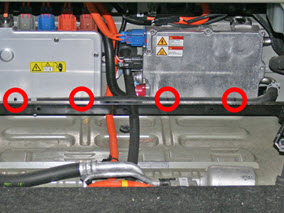
- Remove the crossbar from the vehicle.
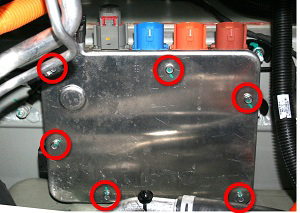
- Release the bolts (x6) that secure the forward junction box
cover (torque 6.5 Nm). Remove the cover.
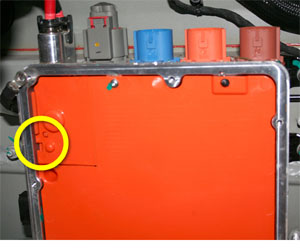
- Use a small, insulated screwdriver or similar tool to pry open
the cover on the RH side of the FJB.
Warning: Do not use a metallic tool to open the cover.
- Use a multimeter to check voltages between:
- B+ to ground
- B- to ground
- B+ and B-
- Remove the screws (x3) that secure the plastic cover (torque 3
Nm).
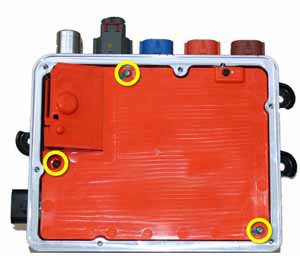
- Use the fuse puller to remove the fuse.
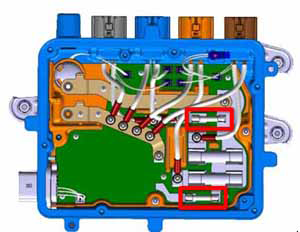
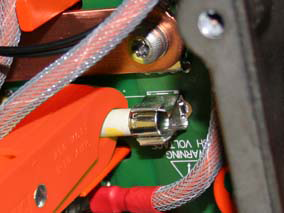
Installation procedure is the reverse of removal.
READ NEXT:
 Forward Junction Box - 2nd Generation - 40 Amp Fuse (RWD) (Remove and
Replace)
Forward Junction Box - 2nd Generation - 40 Amp Fuse (RWD) (Remove and
Replace)
Warning: Only technicians who have been trained in High
Voltage Awareness are permitted to perform this procedure. Proper
personal protective equipment (PPE) and insulating HV gloves with a
Forward Junction Box (Dual Motor) (Remove and Replace)
Warning: Only technicians who have been trained in High
Voltage Awareness are permitted to perform this procedure. Proper
personal protective equipment (PPE) and insulating HV gloves with a
HV Junction Box - 1st Generation (Remove and Replace)
Warning: Only technicians who have been trained in High
Voltage Awareness are permitted to perform this procedure. Proper
personal protective equipment (PPE) and insulating HV gloves with a
SEE MORE:
Stop Signs and Road Markings
When driving with Autosteer or Traffic-aware Cruise Control engaged, and
Traffic Light and Stop Sign Control
enabled, Model S is designed to respond as follows when approaching
intersections controlled by stop signs, stop
lines, or road markings:
No Traffic Control
Arm of T-junction
M
Battery - Auxiliary - 12V (RHD) (Remove and Replace)
Warning: If the 12V power supply is disconnected, do
not attempt to open any doors with door glass in closed position.
Failure to follow this instruction could result in door glass
shatter.
Note: Before disconnecting the 12V power supply,
ensure that the driver's door window
