
Tesla Model S: Handle - Exterior Release - Door - Front - LH (Remove and Replace)
Tesla Model S (2012-2026) Service Manual / Closures / Handle - Exterior Release - Door - Front - LH (Remove and Replace)
Removal
- Remove regulator assembly (refer to procedure)
- Make sure exterior release handle is fully retracted.
- Disconnect handle harness connector.
- Remove nuts (x4) securing door release assembly to reinforcement (torque 9 Nm).
- Carefully release door handle assembly from door outer panel.
Caution: Take care not to damage component(s).
Caution: Protect exterior paint surfaces during this procedure.
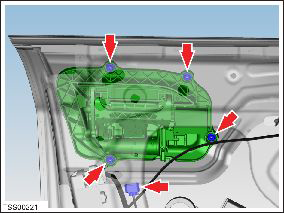
- Remove exterior release handle assembly from door.
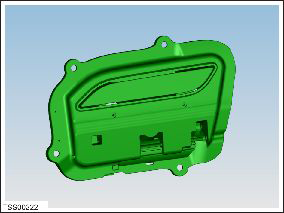
- Remove door handle rear seal.
- Remove screws (x4) securing handle grip backplate and remove
(torque 2 Nm).
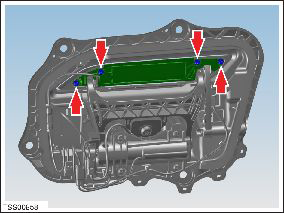
- Release LED from door grip.
- Release door grip from fork and remove.
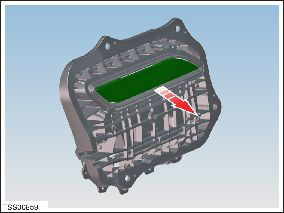
Installation is the reverse of removal, except for the following:
- Install the grip and back plate on the new handle assembly before reinstallation.
-
Use Toolbox to update or redeploy the firmware:
- If the vehicle is not running the latest firmware, run the "Vehicle Firmware Update" procedure.
- If the vehicle is running the latest firmware, run the "Firmware Redeploy" procedure.
- After installation, check operation of replacement door handle.
READ NEXT:
 Handle - Exterior Release - Door - Rear - LH (Remove and Replace)
Removal
Remove regulator assembly (refer to procedure)
Make sure exterior release handle is fully retracted.
Disconnect handle harness connector.
Remove nuts (x4) securing door re
Grip - Door - Exterior Handle - Front - LH (Remove and Replace)
Removal
Remove grip backplate (refer to procedure) .
Release LED from door grip.
Release door grip from fork and remove.
Grip - Door - Exterior Handle - Rear - LH (Remove and Replace)
Removal
Remove grip backplate (refer to procedure)
Release LED from door grip.
Remove door grip from fork.
Ins
SEE MORE:
Debris or moisture in the A/C system
Internally or externally damaged components can cause debris and
moisture to enter the A/C system. Perform the following procedures if
debris or excessive moisture ingress is suspected.
Caution: Do not attempt to use an A/C refrigerant flushing kit
with Model S and Model X.
A/
Position Sensor - Door - Exterior Handle - Rear - LH (Remove and Replace)
Removal
Remove door handle for access (refer to procedure)
Remove door handle rear seal.
Remove control link pivot pin to allow control link to be
released from housing.
Position control link and remove screw se
© 2019-2026 Copyright www.tesms.org
