
Tesla Model S: HVAC Assembly (Remove and Replace)
Tesla Model S (2012-2026) Service Manual / Thermal Management / HVAC Assembly (Remove and Replace)
Removal
- Remove cross car beam (refer to procedure).
- Recover refrigerant from AC system (refer to procedure).
- Disconnect AC connection to HVAC, discard 'O' rings (torque 22
Nm).
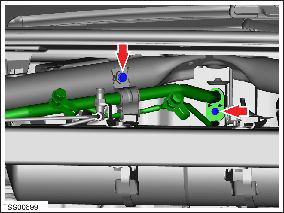
- Remove screws (x2) securing bulkhead TXV valve to HVAC (torque 6 Nm).
- Disconnect TXV harness connector.
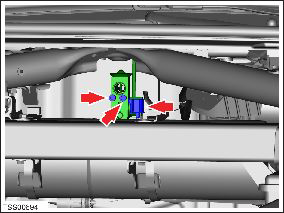
- Remove and discard 'O' ring. Caution: Lubricate new O-rings with clean refrigerant oil.
- Disconnect HVAC harness connectors (x10).
- LHD vehicles only: Remove the body controller (BCM) (refer to procedure).
- Remove bolts (x7) securing HVAC to bulkhead (torque 6 Nm).
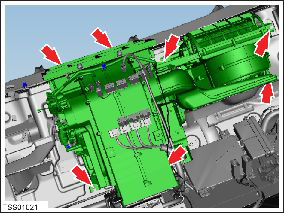
- Disconnect HVAC drain tube.
- Remove plastic rivets (x3) securing front LH shock tower cover
to body. Release cover and remove.
.png)
- Working from above, disconnect harness connector from DC-DC
module.
Note: Components have been removed in this graphic to aid clarity.
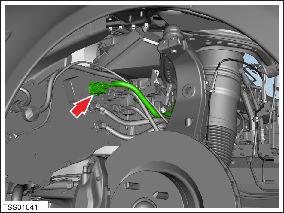
- Attach a tether to the PTC heater harness.
- With assistance carefully release PTC harness from bulkhead and withdraw into footwell.
- Disconnect tether from harness connector. Note: Do not withdraw tether from bulkhead.
- Carefully remove HVAC and place on padded surface to prevent damage.
Caution: Plug pipe connections to prevent ingress of moisture or dirt.
Installation- Installation procedure is the reverse of removal. Caution: Lubricate new O-rings with clean refrigerant oil.
- With assistance carefully pull DC-DC harness through bulkhead. Follow route left by tether, check surrounding components are not compromised. Cable tie and clip harness and hoses to avoid rubbing.
- Disconnect tether from harness connector.
READ NEXT:
 Actuator - Inlet (Remove and Replace)
Removal
Remove glove box assembly (refer to procedure)
Disconnect actuator harness connector.
Remove screws (x3) securing recirculation actuator to HVAC
assembly (torque 1 Nm).
Actuator - Driver's Temperature (Remove and Replace)
Removal
Remove IP carrier (refer to procedure)
Disconnect duct temperature sensor harness connector.
Remove screw securing duct to HVAC assembly and position duct
aside (torque 1
Actuator - Mode (Remove and Replace)
Removal
Remove IP carrier (refer to procedure)
Disconnect duct temperature sensor harness connector.
Remove screw securing duct to HVAC assembly and position duct
aside (torque 1
SEE MORE:
Adjusting Ride Height
CAUTION: Before adjusting the suspension height,
ensure Model S is clear of all obstacles, above and
below.
You can manually adjust the ride height by pressing the
brake pedal touching Controls > Suspension on the
touchscreen. The ride height settings that are available
depend on your d
Pull Onto Flatbed Truck From Rear
(Using Tow Eye)
NOTE: If Model S has no low voltage power, you need an
external low voltage power supply to open the hood or
use the touchscreen. See If Vehicle Has No Power.
NOTE: Vehicles equipped with a hitch receiver cannot be
pulled from the rear tow eye. Use the tow bar or hitch
receiver only to pull the
© 2019-2026 Copyright www.tesms.org
