
Tesla Model S: Light - License Plate (Remove and Replace)
Tesla Model S (2012-2026) Service Manual / Electrical / Light - License Plate (Remove and Replace)
Removal
- Remove the screws (x5) that secure the rear applique bracket to
the tailgate.
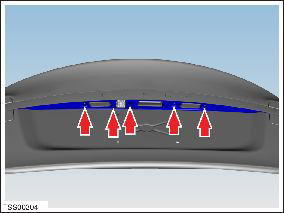
- Remove the rear applique bracket.
- Release the license plate light from the liftgate opening.
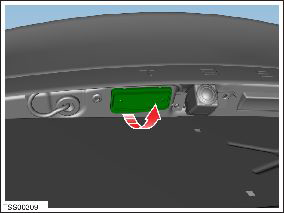
- Disconnect the light connector and remove the license plate
light.
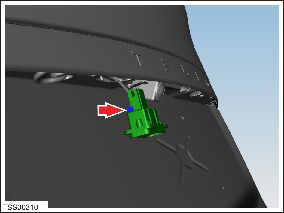
Installation procedure is the reverse of removal.
READ NEXT:
 Light - Fog/Reverse - Rear - LH (Remove and Replace)
Removal
Remove the liftgate applique (refer to procedure).
Remove the tailgate lower finisher (refer to procedure).
Release the watershield for access to the fog/reverse lamp.
Lamp - Side Repeater - Front - LH (Remove and Replace)
Removal
Using a suitable tool carefully release fixing lugs (x2)
securing side repeater to front fender. NOTE: Wheel arch liner
removed for clarity.
Caution:
Lamp - Reflex - Rear - LH (Remove and Replace)
Removal
Remove rear fascia assembly for access (refer to procedure)
Release clips (x2) securing reflex lamp to rear fascia.
Remove reflex lamp.
SEE MORE:
Environmental Precautions
General
This section provides general information which can help to reduce the
environmental impacts from the activities carried out in workshops.
Emissions to air
Many of the activities that are carried out in workshops emit gases and
fumes which contribute to global warming, depletion
Seal - Door - Rear - C Pillar - Margin - LH (Remove and Replace)
Removal
Remove door trim (refer to procedure)
Release clips (x3) securing flap seal end to door.
Note: Components have been removed in this
graphic to aid clarity.
Caution: Take care not to damage component(s).
Carefully release remai
© 2019-2026 Copyright www.tesms.org
