
Tesla Model S: Panel - Aero Shield - Mid (Remove and Replace)
Tesla Model S (2012-2026) Service Manual / Exterior fittings / Panel - Aero Shield - Mid (Remove and Replace)
Removal
- Remove the LH diffuser tray rails (refer to procedure).
- Repeat step 1 for the RH diffuser tray rails.
- Remove the bolts (x9) that secure the mid aero shield panel to
the body (torque 4 Nm).
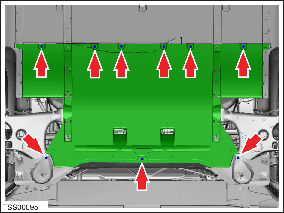
- Remove the mid aero shield panel.
Installation procedure is the reverse of removal.
READ NEXT:
 Panel - Diffuser Tray - Rear (Remove and Replace)
Removal
Remove rear fascia assembly (refer to procedure)
Remove bolts (x6) and plastic rivets (x2) securing rear diffuser
to rear fascia and applique (torque 3 Nm).
Rails - Diffuser Tray Rear - LH (Remove and Replace)
Warning: If the vehicle has air suspension, activate "Jack"
mode on the touchscreen before raising and supporting the vehicle.
Removal
Raise and support the vehicle (refer to pro
Rear Lettering (Remove and Replace)
Special tool(s) required for this procedure:
Supplier
Part Number
Template color
Description
SEE MORE:
Carrier - Bumper - Front (Remove and Replace)
Warning: If the vehicle has air suspension, activate "Jack"
mode on the touchscreen before raising and supporting the vehicle.
Removal
Recover refrigerant from the vehicle (refer to procedure).
Raise and support the vehicle (refer to procedure).
Remove the radiator (ref
Lane Assist
Model S monitors the markers on the lane you are
driving in as well as the surrounding areas for the
presence of vehicles or other objects.
When an object is detected in your blind spot or near
the side of Model S (such as a vehicle, guard rail, etc.),
the instrument panel displays colored line
© 2019-2026 Copyright www.tesms.org
