
Tesla Model S: Panel - Diffuser Tray - Rear (Remove and Replace)
Tesla Model S (2012-2026) Service Manual / Exterior fittings / Panel - Diffuser Tray - Rear (Remove and Replace)
Removal
- Remove rear fascia assembly (refer to procedure)
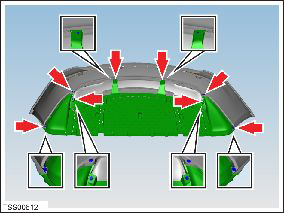
- Remove bolts (x6) and plastic rivets (x2) securing rear diffuser
to rear fascia and applique (torque 3 Nm).
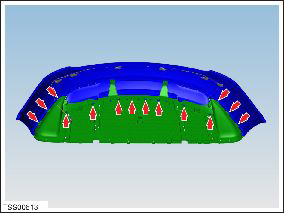
- Carefully release clips (x14) securing rear diffuser to rear
fascia, trim and applique.
- Remove rear diffuser tray.
- Remove u-nuts (x6) from diffuser tray.
Installation procedure is the reverse of removal.
READ NEXT:
 Rails - Diffuser Tray Rear - LH (Remove and Replace)
Warning: If the vehicle has air suspension, activate "Jack"
mode on the touchscreen before raising and supporting the vehicle.
Removal
Raise and support the vehicle (refer to pro
Rear Lettering (Remove and Replace)
Special tool(s) required for this procedure:
Supplier
Part Number
Template color
Description
Applique - Liftgate (Remove and Replace)
Special tool required for this procedure:
Supplier
Part Number
Description
Tesla
1049517-0
SEE MORE:
Tuner - AM - FM (Remove and Replace)
Note: This procedure applies to both base and premium
tuners (premium pictured).
Removal
Remove the driver side lower dash trim (refer to procedure).
Remove the driver side dash footwell closing trim (refer to
procedure).
Remove the 3 bolts that secure the retai
TPMS - Set Thresholds
Note: This procedure
only applies to vehicles with the Baolong TPMS system (vehicles
built before approximately September 10, 2014).
Set thresholds
In the Service Manual, refer to
General Information > Technical Data > Tire pressures. Note the
appropriate hard a
© 2019-2026 Copyright www.tesms.org
