
Tesla Model S: Pipe - High Pressure - Charge Port (Remove and Replace)
Tesla Model S (2012-2026) Service Manual / Thermal Management / Pipe - High Pressure - Charge Port (Remove and Replace)
Removal
- Recover refrigerant from the vehicle (refer to procedure)
- Remove underhood storage unit (refer to procedure)
- Remove nut securing pipe retaining plate to evaporator TXV (torque 22 Nm).
- Remove bolt securing A/C pipe bracket to cross-brace (torque 6
Nm).
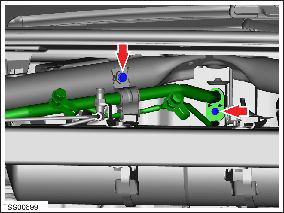
- Release high pressure charge port pipe from bracket.
- Remove bolt securing high pressure charge port pipe at union to high pressure condenser / chiller pipe (torque 8 Nm). Caution: Plug pipe connections to prevent ingress of moisture or dirt. Caution: Remove and discard O-rings.
- Remove bolts (x2) securing A/C pipe brackets to crossmember and
RH shock tower (torque 6 Nm).
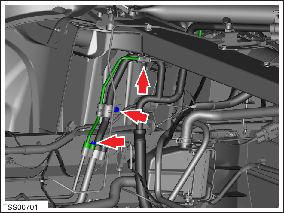
- Release high pressure charge port pipe from brackets (x2).
- Maneuver and remove pipe.
Installation procedure is the reverse of removal, except for the following:
Caution: Lubricate new O-rings with clean refrigerant oil.
READ NEXT:
 Pipe - High Pressure - Compressor to Condenser (Remove and Replace)
Removal
Recover refrigerant from the vehicle (refer to procedure).
Remove the underhood storage unit (refer to procedure).
Remove the bolt that secures the high pressure pipe to the
Pipe - High Pressure - Compressor to Condenser (Dual Motor) (Remove and
Replace)
Removal
Position the vehicle on a lift, but do not raise it at this
time.
Recover refrigerant from the vehicle (refer to procedure).
Remove the 12V battery (refer to procedure).
Pipe - Low Pressure - Charge Port (Remove and Replace)
Removal
Recover refrigerant from the vehicle (refer to procedure).
Remove the underhood storage unit (refer to procedure).
Disconnect the low pressure temperature transducer connector
SEE MORE:
Glass - Door Mirror - LH (Remove and Replace)
Warning: To avoid personal injury, eye protection must be
worn when performing this operation.Warning: To avoid personal injury, wear cut-resistant
gloves when performing this operation.
Removal
Carefully push the inboard side of the door mirror glass into
the assembl
Unable to charge - Wall Connector issue
Wall Connector needs service
What this alert means:
Wall Connector hardware issue. Possible issues include:
Contactor not working
Self-test of internal ground fault monitoring circuit failed
Thermal sensor disconnected
Other hardware component issues
What to do:
An internal issue was detected
© 2019-2026 Copyright www.tesms.org
