
Tesla Model S: Press Sensor - Door - Exterior Handle - Front - LH (Remove and Replace)
Tesla Model S (2012-2026) Service Manual / Closures / Press Sensor - Door - Exterior Handle - Front - LH (Remove and Replace)
Removal
- Remove door handle for access (refer to procedure)
- Position handle assembly on a soft working surface.
- Remove door handle rear seal.
- Remove cable ties securing door pressure sensor and motor wiring.
- Release motor harness connector.
- Remove press sensor screw.
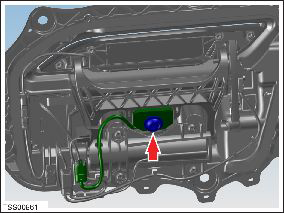
- Release door press sensor wiring connector.
- Using a suitable flat blade, release double sided tape and
remove the sensor from the fork.
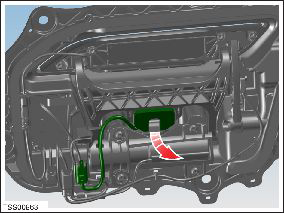
- Installation procedure is the reverse of removal, except for the following.
- Clean mating face of fork
- Remove backing tape from sensor and attach to fork.
- Install door press sensor fixing screw engaging the first ten threads.
READ NEXT:
 Press Sensor - Door - Exterior Handle - Rear - LH (Remove and Replace)
Removal
Remove door handle for access (refer to procedure)
Position handle assembly on a soft working surface.
Remove door handle rear seal.
Remove cable ties securing door pressu
Position Sensor - Door - Exterior Handle - Front - LH (Remove and Replace)
Removal
Remove door handle for access (refer to procedure)
Remove door handle rear seal.
Remove control link pivot pin to allow control link to be
released from housing.
Posit
Position Sensor - Door - Exterior Handle - Rear - LH (Remove and Replace)
Removal
Remove door handle for access (refer to procedure)
Remove door handle rear seal.
Remove control link pivot pin to allow control link to be
released from housing.
SEE MORE:
Powertrain Coolant Pump 1 (RWD) (Remove and Replace)
Coolant pump locations:
RWD Model S
Dual Motor Model S
1
Powertrain coolant pump 1
RWD vehicle
2
Battery coolant pump 2
RWD vehicle
3
Battery coolant pump 1
RWD vehicle
Striker - Liftgate (Remove and Replace)
Removal
Open liftgate.
Remove liftgate striker cover.
Remove bolts (x2) securing striker to body (torque 10 Nm).
Remove striker from vehicle.
© 2019-2026 Copyright www.tesms.org
