
Tesla Model S: Rear View Mirror - 2nd Generation (Remove and Replace)
Tesla Model S (2012-2026) Service Manual / Interior trim / Rear View Mirror - 2nd Generation (Remove and Replace)
Note: This procedure describes how to remove and replace the 2nd generation rear view mirror. If the vehicle is equipped with a 1st generation rear view mirror, refer to procedure 15050202 (refer to procedure).
Removal
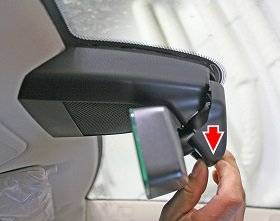
- Remove the front cover by pulling straight down to release the
clips.
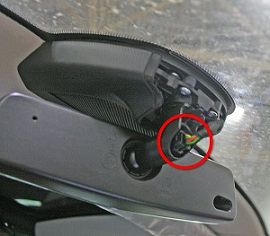
- Disconnect the rear view electrical connector.
- Release the rearview mirror by turning it clockwise until it
pulls free.
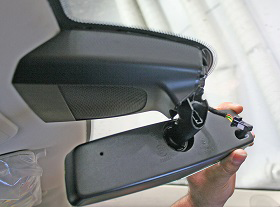
- Remove the mirror.
Installation procedure is the reverse of removal.
READ NEXT:
 Sun Visor - Driver's (Remove and Replace)
Removal
Use a trim stick or other non-marring pry tool to release the
visor mounting cover.
Caution: Take care not to damage component(s).
Assembly - Mirror - Sun Visor - LH (Remove and Replace)
Removal
Fold down the sun visor.
Starting at the top of the mirror assembly, use a trim tool to
pry the mirror assembly from the sun visor.
Trim - Rear View Mirror (Remove and Replace)
Removal
Position vehicle for access to front doors.
Cover dash assembly to avoid damage.
Caution: Make sure the touch screen is fully
protected.
SEE MORE:
About this Owner Information
Document Applicability
For the latest and greatest information that is
customized to your vehicle, view the Owner's Manual on
your vehicle's touchscreen by touching Controls >
Service > Owner's Manual. The information is specific to
your vehicle depending on the features you purchased,
ve
Range Assurance
The driving range displayed in Model S is an estimate of
the remaining battery energy based on EPA-rated
consumption. It may not account for your personal
driving patterns or external conditions. The displayed
range on the instrument panel may decrease faster than
the actual distance driven.
NO
© 2019-2026 Copyright www.tesms.org
