
Tesla Model S: Applique - Fascia - Front - 1st Generation (Remove and Replace)
Tesla Model S (2012-2026) Service Manual / Body / Applique - Fascia - Front - 1st Generation (Remove and Replace)
Note: This procedure describes how to remove and replace the 1st generation front fascia applique. If the vehicle is equipped with a 2nd generation front fascia applique, refer to procedure 10011302 (refer to procedure).
Removal
- Remove the front fascia grill (refer to procedure).
- If installed, remove the clips (x3) that secure the license
plate mounting panel to the applique. Remove the license plate
mounting panel.
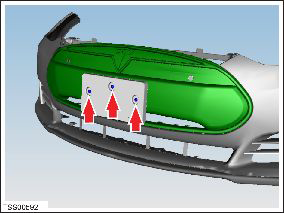
- If installed, disconnect the parking sensor connectors (x2).
- Release the harness clips (x7) that secure the fascia harness to
the applique.
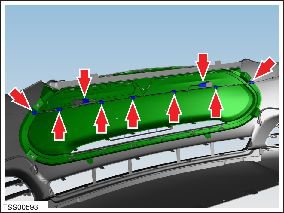
- Carefully release the parking distance sensors (x2) from the applique retaining rings.
- Carefully release and remove the sensor retaining rings (x2) from the applique. Caution: Care must be taken to avoid damage to paintwork and exterior trim.
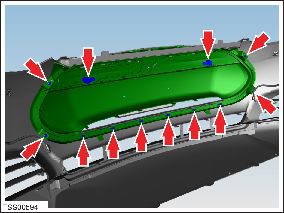
- Remove the screws (x4) that secure the applique to the fascia (torque 1 Nm).
- Release the clips (x6) that secure the applique to the fascia.
Installation procedure is the reverse of removal, except for the following:
If using this procedure to convert the old fascia assembly to the new fascia assembly, use Toolbox to update the PSRCM calibration. Refer to SB-13-17-002 for affected VINs and calibration instructions.
READ NEXT:
 Applique - Fascia - Front - 2nd Generation (Remove and Install)
Note: This procedure describes how to remove and
install the 2nd generation front fascia applique. If the vehicle is
equipped with a 1st generation front fascia applique, refer to
procedur
Applique - Fascia - Front - 2nd Generation (Remove and Replace)
Note: This procedure describes how to remove and replace
the 2nd generation front fascia applique. If the vehicle is equipped
with a 1st generation front fascia applique, refer to procedure
Grill - Fascia - Front (Remove and Replace)
Removal
Vehicles with 1st generation front fascia applique only:
Remove the front fascia applique refer to procedure.
Vehicles with 2nd generation front fascia applique only:
Remo
SEE MORE:
HV Battery Assembly (Remove and Install)
Warning: Only technicians who have been trained in High
Voltage Awareness are permitted to perform this procedure. Proper
personal protective equipment (PPE) and insulating HV gloves with a
minimum rating of class 00 (500V) must be worn any time a high
voltage cable is handled. Refer
Trim - 'B' Post - Upper - LH (Remove and Replace)
Removal
Remove the LH lower 'B' post trim (refer to procedure).
Remove the plastic trim that covers the seat belt fixing on the
driver's seat.
Remove the bolt that secures the fixed seat belt end to
© 2019-2026 Copyright www.tesms.org
