
Tesla Model S: Seal - Door - Rear - C Pillar - Margin - LH (Remove and Replace)
Tesla Model S (2012-2026) Service Manual / Closures / Seal - Door - Rear - C Pillar - Margin - LH (Remove and Replace)
Removal
- Remove door trim (refer to procedure)
- Release clips (x3) securing flap seal end to door. Note: Components have been removed in this graphic to aid clarity. Caution: Take care not to damage component(s).
- Carefully release remaining clips (x13).
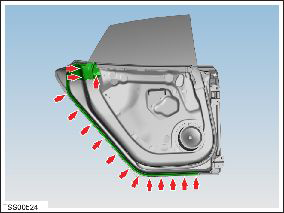
- Remove door seal.
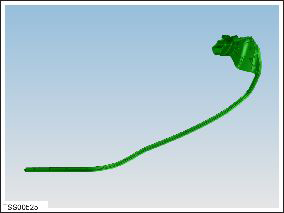
Installation procedure is the reverse of removal.
Note: Clean the affected areas before installation.
READ NEXT:
 Seal - Rear Door - LH (Remove and Replace)
Removal
Remove door trim (refer to procedure)
Release clips (x2) securing flap seal end to door.
Note: Components have been removed in this graphic
to aid
Seal - Hood (Remove and Replace)
Removal
Open the luggage compartment.
Release the seal from luggage compartment surround.
Note: Components have been removed in this
graphic to aid clarity
Seal - Liftgate (Remove and Replace)
Removal
Open vehicle tailgate.
Release tailgate seal from body and carefully remove.
Note: Components have been removed in this graphic
to aid clarity.
SEE MORE:
Drop In Center Console Assembly (Remove and Replace)
Removal
Move the front seats to their rearmost positions to allow for
additional access.
Unplug the phone adaptor cable from the USB connector, if
installed.
Pull the two panels off from the sides of the center
Trim - 'C' Post Rear - LH (Remove and Replace)
Removal
Remove the parcel shelf, if equipped.
If the LH C-Pillar rear trim panel has a liftgate switch, reach
behind the C-pillar rear trim panel and push the switch out from the
back. If not, skip to step 4.
Di
© 2019-2026 Copyright www.tesms.org
