
Tesla Model S: Shield - Dust - Brake - Rear - LH (Remove and Replace)
Tesla Model S (2012-2026) Service Manual / Brakes / Shield - Dust - Brake - Rear - LH (Remove and Replace)
Warning: If the vehicle has air suspension, activate "Jack" mode on the touchscreen before raising and supporting the vehicle.
Removal
- Remove the rear hub (refer to procedure).
-
Remove the screws (x3) that secure the rear
brake dust shield to the knuckle (torque 8 Nm).
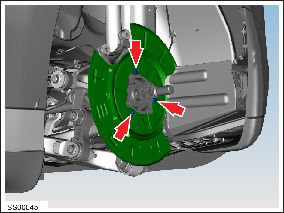
- Remove the rear brake dust shield.
Installation procedure is the reverse of removal. Note: Clean the affected areas before installation.
READ NEXT:
 Shield - Dust - Brake - Front - 2nd Generation (Retrofit)
Procedure
Remove the front hub assembly
(refer to procedure).
Install the dust shield using the 2 existing
holes in the knuckle (torque 8 Nm).
Master Cylinder and Reservoir Assembly (Remove and Install)
Note: This procedure
applies to vehicles with the vacuum brake booster only. If the
vehicle has the electromechanical brake booster assembly, the
master cylinder and reservoir assembly
Master Cylinder (Remove and Replace)
Note: This procedure
applies to vehicles with the vacuum brake booster only. If the
vehicle has the electromechanical brake booster assembly, the
master cylinder is part of the brake bo
SEE MORE:
Condenser - Sub-cool (Remove and Replace)
Removal
Recover refrigerant from the vehicle (refer to procedure)
Remove front aero shield panel (refer to procedure)
Remove front RH wheel arch liner (refer to procedure)
Remove bolts (x2) securing front bumper panel support bar and
remove (torque 11 Nm).
Hose - Front HVAC - Drain (Dual Motor) (Remove and Replace)
Remove
Perform the electrical isolation procedure (refer to procedure).
Remove the RH steering brace:
Remove the bolt that secures the steering brace to
the subframe (torque 26 Nm).
© 2019-2026 Copyright www.tesms.org
