
Tesla Model S: Underhood Apron - Center - Rear (Remove and Replace)
Tesla Model S (2012-2026) Service Manual / Exterior fittings / Underhood Apron - Center - Rear (Remove and Replace)
Removal
- Remove the LH underhood apron (refer to procedure).
- Remove the RH underhood apron.
- Release the clips (x5) that secure the rear center underhood
apron to the plenum.
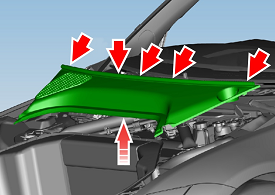
- Remove the rear center underhood apron.
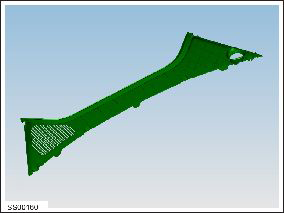
Installation procedure is the reverse of removal.
READ NEXT:
 Underhood Apron - LH (Remove and Replace)
Removal
Open the hood.
Release the lugs (x3) that secure the LH underhood apron to the
inner fender.
Caution: Take care not to damage component(s).
Motor - Seat Tilt - Driver's Seat (Remove and Replace)
Removal
Remove the driver's seat (refer to procedure).
Place the seat on a clean work surface.
Remove the screw that secures the inner side cover to the seat
(torque 1 Nm).
SEE MORE:
Controlling Audible Feedback
You can use Park Assist with or without audible
feedback. To turn chimes on or off, touch Controls >
Safety > Park Assist Chimes.
To mute the chimes temporarily, touch the speaker icon
in the bottom corner of the Park Assist view. The chimes
are muted until you shift or drive over 5 mph (
Replacing Cabin Air Filters
Model S has an air filter that prevents pollen, industrial
fallout, road dust, and other particles from entering the
cabin through the vents. Tesla recommends replacing
these filters every 2 years (every year in China). Cabin
filters can be purchased at the Tesla online store.
To replace the ca
© 2019-2026 Copyright www.tesms.org
