
Tesla Model S: Speaker - Rear - LH/RH (Remove and Replace)
Tesla Model S (2012-2026) Service Manual / Infotainment / Speaker - Rear - LH/RH (Remove and Replace)
Removal
- Open tailgate to suitable working height.
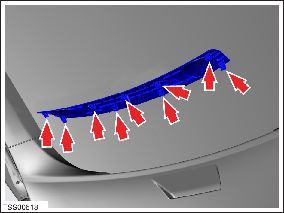
- Carefully release speaker cover clips (x9) from tailgate. Caution: Take care not to damage component(s).
- Remove speaker covers and position aside.
- Remove screws (x4) securing speakers (x2) to tailgate (torque 1
Nm).
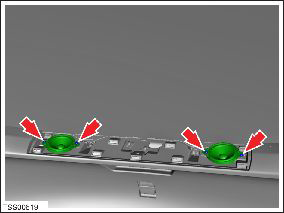
- Release speakers and disconnect wiring harness connections (x2).
Note: Mark speaker connectors before disconnecting for identification purposes.
- Remove both speakers.
- Installation procedure is the reverse of removal except for the following
- Inspect and replace speaker screw grommets.
READ NEXT:
 Premium Boost Amplifier (Remove and Replace)
Removal
Release latch, disconnect amplifier harness connector and
position aside.
Caution: Take care not to damage component(s).
Tuner - AM - FM (Remove and Replace)
Note: This procedure applies to both base and premium
tuners (premium pictured).
Removal
Remove the driver side lower dash trim (refer to procedure).
Remove the driver si
Antenna Amplifier - AM/FM and RKE (Remove and Replace)
Removal
Remove the LH liftgate trim (refer to procedure).
Remove the screw that secures the amplifier to the liftgate.
Carefully disconnect the amplifier connector.
Release th
SEE MORE:
Pipe - High Pressure - Sub-Cool Condenser to Chiller (Remove and Replace)
Removal
Recover refrigerant from the vehicle (refer to procedure)
Remove front skid plate (refer to procedure)
Remove nut (x1) securing pipe to sub-cool condenser (torque 8
Nm).
Remove nut (x1) securing pipe retaining plate to TXV (torque 12
Nm).
Maximum battery charge level reduced
OK to drive - Schedule service
Your vehicle has detected a condition internal to the high voltage battery
that is limiting the battery's performance.
As a result, maximum charge level and range are reduced. Service is required to
restore full performance.
Your vehicle is OK to drive and charge.
I
© 2019-2026 Copyright www.tesms.org
