
Tesla Model S: Striker - Door - Front - LH (Remove and Replace)
Tesla Model S (2012-2026) Service Manual / Closures / Striker - Door - Front - LH (Remove and Replace)
Removal
- Open door.
- Remove countersunk screws (x2) securing striker plate to 'B'
pillar (torque 22 Nm).
Note: Note installed position of components before removal.
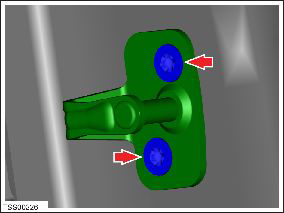
- Remove door striker.
Installation procedure is the reverse of removal, except for the following:
Adjust
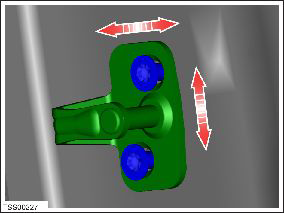
Check and adjust door to body as required.
READ NEXT:
 Striker - Door - Rear - LH (Remove and Replace)
Removal
Open door.
Remove countersunk screws (x2) securing striker plate to rear
door (torque 22 Nm).
Note: Note installed position of components before
removal.
Handle - Interior Release - Door - Front - LH (Remove and Replace)
Removal
Remove front door trim panel (refer to procedure)
Release clips and remove door pad finisher.
Caution: Take care not to damage component(s).
Handle - Interior Release - Door - Rear - LH (Remove and Replace)
Removal
Remove the rear door trim panel (refer to procedure).
Remove the screws (x3) and the nut (x1) that secure the interior
door handle to the trim pad (torque 3 Nm).
SEE MORE:
Drive Unit - Rear - Small (Remove and Install)
Special tools required for this procedure:
Caution: Use the specified coolant only. In this manual, refer
to General Information > Capacities, Fluids, and
Lubricants > Fluids.
Supplier
Part Number
Descr
Receiver Dryer and Desiccant (Remove and Replace)
Note: The desiccant bag in the receiver dryer is a
serviceable item and must be replaced every 2 years, whenever the
system is opened to ambient air for an extended time, or when an A/C
system leak has been fixed.
Note: The dessicant is located in the RH condenser.
Removal
© 2019-2026 Copyright www.tesms.org
