
Tesla Model S: Striker - Door - Rear - LH (Remove and Replace)
Tesla Model S (2012-2026) Service Manual / Closures / Striker - Door - Rear - LH (Remove and Replace)
Removal
- Open door.
- Remove countersunk screws (x2) securing striker plate to rear
door (torque 22 Nm).
Note: Note installed position of components before removal.
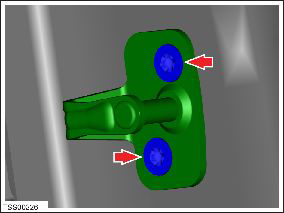
- Remove door striker.
Installation procedure is the reverse of removal.
Adjust
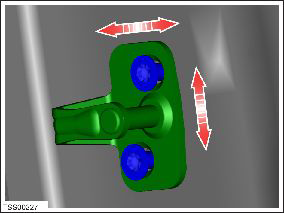
Check and adjust door to body as required.
READ NEXT:
 Handle - Interior Release - Door - Front - LH (Remove and Replace)
Removal
Remove front door trim panel (refer to procedure)
Release clips and remove door pad finisher.
Caution: Take care not to damage component(s).
Handle - Interior Release - Door - Rear - LH (Remove and Replace)
Removal
Remove the rear door trim panel (refer to procedure).
Remove the screws (x3) and the nut (x1) that secure the interior
door handle to the trim pad (torque 3 Nm).
Handle - Exterior Release - Door - Front - LH (Remove and Replace)
Removal
Remove regulator assembly (refer to procedure)
Make sure exterior release handle is fully retracted.
Disconnect handle harness connector.
Remove nuts (x4) securing door re
SEE MORE:
Cable - Latch - Hood - LH (Dual Motor) (Remove and Replace)
Removal
Remove the underhood storage unit (refer to procedure).
Release the rear cable from the latch assembly.
Note: If performing this procedure on the
RH side, release the front cable.
Hinge - Hood - LH (Remove and Replace)
Removal
Remove the hood assembly (refer to procedure).
Mark the installed position of the hinge to the hood.
Remove the nuts (x2 or x3) that secure the LH hinge to the hood
(torque 24 Nm).
Caution: Protect exterior paint work from possible
damage during this pr
© 2019-2026 Copyright www.tesms.org
