
Tesla Model S: Window Guide Rail (Remove and Replace)
Tesla Model S (2012-2026) Service Manual / Closures / Window Guide Rail (Remove and Replace)
Window Guide Rail - Front - LH (Remove and Replace)
Removal- Remove front quarter body glass (refer to procedure)
- Removal of the front quarter glass also removes front window guide rail. Caution: Take care not to damage component(s).
Installation procedure is the reverse of removal.
Window Guide Rail - Rear - LH (Remove and Replace)
Note: This part has been deleted starting with VIN 5YJSA1DP9CFS00528, and is not found on vehicles built after October 11, 2012.Removal
- Raise door glass.
- Remove door trim pad (refer to procedure)
- Remove clip securing door seal and reposition door seal for
access.
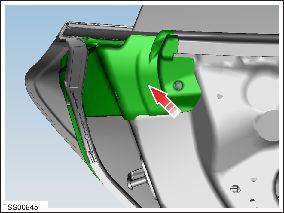
- Remove bolt securing window guide to door (torque 11 Nm). NOTE:
Seal removed for clarity.
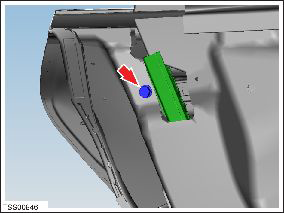
- Remove nut securing window guide to door and remove guide
(torque 11 Nm).
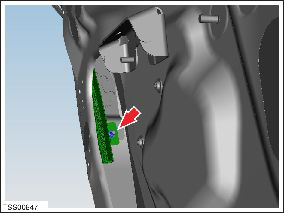
Installation procedure is the reverse of removal.
READ NEXT:
 Window Motor/Regulator Assembly - Front - LH (Remove and Replace)
Removal
Remove window glass (refer to procedure)
Remove bolts (x3) securing door control unit to door and tie
aside (torque 1 Nm).
Remove screws (x6) securing regulator closing pa
Window Motor/Regulator Assembly - Rear - LH (Remove and Replace)
Removal
Remove rear window glass (refer to procedure)
Remove waterproof tape to expose nuts.
Note: Components have been removed in this graphic to aid
clar
Seal - Body - Side - Front - Primary - LH (Remove and Replace)
Removal
Remove the 'B' post upper trim (refer to procedure).
Release the clips (x3) that secure the leading edge of the seal
to the body.
Caution: Take care
SEE MORE:
Drop In Center Console Assembly (Remove and Replace)
Removal
Move the front seats to their rearmost positions to allow for
additional access.
Unplug the phone adaptor cable from the USB connector, if
installed.
Pull the two panels off from the sides of the center
Receiver Dryer and Desiccant (Remove and Replace)
Note: The desiccant bag in the receiver dryer is a
serviceable item and must be replaced every 2 years, whenever the
system is opened to ambient air for an extended time, or when an A/C
system leak has been fixed.
Note: The dessicant is located in the RH condenser.
Removal
© 2019-2026 Copyright www.tesms.org
