
Tesla Model S: Accelerator Assembly (Remove and Replace)
Tesla Model S (2012-2026) Service Manual / Instrument Panels and Pedals / Accelerator Assembly (Remove and Replace)
Removal
- Remove the driver's footwell cover:
- Left-hand drive (LHD) vehicles: Refer to procedure.
- Right-hand drive (RHD) vehicles: Refer to procedure.
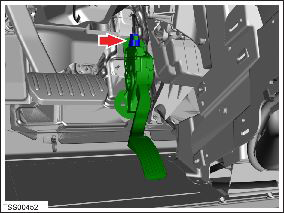
- Disconnect the harness connector from the top of the accelerator
pedal assembly.
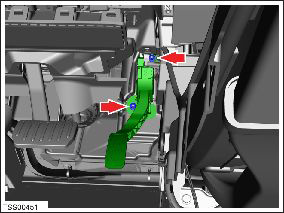
- Remove the nuts (x2) that secure the accelerator pedal assembly
to the mounting bracket (torque 9 Nm).
- Release the accelerator pedal assembly from the mounting bracket.
- Remove the accelerator pedal assembly from the vehicle.
Installation procedure is the reverse of removal.
READ NEXT:
 Glove Box (Remove and Replace)
Removal
Remove the RH lower instrument panel (refer to procedure)
Remove the lower glove box panel by releasing the trim clips
(x6).
Glove Box - Latch Release (Remove and Replace)
Removal
Remove glove box assembly (refer to procedure)
Remove screws (x3) securing latch release module to glove box
assembly.
Glove Box - Damper (Remove and Replace)
Removal
Remove glove box assembly (refer to procedure)
Depress clip and remove clevis pin securing damper module to
glove box assembly.
SEE MORE:
Liftgate Glass (Remove)
Warning: To avoid personal injury, wear cut-resistant
gloves when performing this operation.
Note: Use Dow Betaseal Express or an equivalent
fast-curing glass adhesive to perform this procedure.
Special tool recommended for this procedure:
Supplier
Safety
RST-320
Tesla part number:
1005706-00-C
Description:
Model S Coolant Rapidmate Cover
Model:
Model S
Status:
Distribution
© 2019-2026 Copyright www.tesms.org
