
Tesla Model S: Release Cable
Note: This procedure describes how to manually release a cable from the single phase charge port. If the vehicle is equipped with a 3 phase charge port, refer to procedure 44013205 (refer to procedure).
Warning: Only technicians who have been trained in High Voltage Awareness are permitted to perform this procedure. Proper personal protective equipment (PPE) and insulating HV gloves with a minimum rating of class 00 (500V) must be worn any time a high voltage cable is handled. Refer to Tech Note TN-15-92-003, "High Voltage Awareness Care Points" for additional safety information.
Special tool required for this procedure:
| Supplier | Part Number | Description |
| Tesla | 1020288-00-A | TOOL,INSTALLATION,EV INLET,MDLS |
- Perform the vehicle electrical isolation procedure (refer to procedure).
- Remove the LH trunk trim.(refer to procedure)
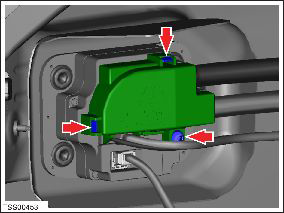
- Remove the screw and release the clips (x2) from the HV inlet cover (torque 4 Nm).
- Remove the HV inlet cover.
Note: When the HV inlet cover is in the proper position, a post on the cover presses a switch in the charge port that activates the HVIL. The vehicle indicates a HVIL fault if the cover is not properly installed or the post is damaged.
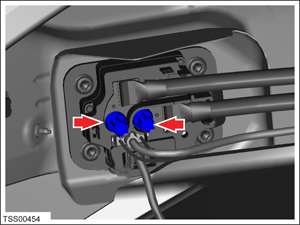
- Remove and discard the 2 bolts (torque 9 Nm) that secure the HV
cables to the charge port. Discard any washers that are installed
between the bolts and the high voltage lugs.
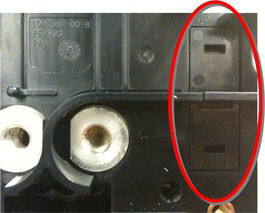
- Pull the tab outward to remove the pawl actuator cover from the
back of the charge port.
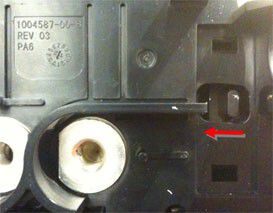
- Push the pawl actuator tab to the left to release the pawl and
hold it in place while an assistant removes the charge cable from
the charge port. Once the charge cable is removed, release the pawl.
READ NEXT:
 Reinstall Components
Installation of components is reverse of removal, except for the
following:
When reconnecting the HV cables to the charge port:
Remove any adhesive patch residue from the mating surface
Charge Port - 3 Phase - Manual Release of Cable
Note: This procedure describes how to manually release a
cable from the 3 phase charge port. If the vehicle is equipped with
a single phase charge port, refer to procedure 44013005 (refer to
Door - Charge Port - Non-Motorized (Remove and Replace)
Removal
Remove the LH tail light assembly (refer to procedure).
Remove the screws (x3) that secure the charge port door to the
tail light assembly.
SEE MORE:
Module - TPMS - Continental (Remove and Replace)
Removal
Remove RH rear seat bolster (refer to procedure).
Remove the 2nd row seat cushion (refer to procedure).
Release the lower section of the RH sill panel to access the
TPMS ECU.
Caution: Do not remove the entire trim panel.
Overview of Climate Controls
Climate controls are available at the bottom of the touchscreen. By default,
climate control is set to Auto, which
maintains optimum comfort in all but the most severe weather conditions. When
you adjust the cabin temperature
while in the Auto setting, the system automatically adjusts the heatin
