
Tesla Model S: Actuator - Front Passenger's Temperature (Remove and Replace)
Tesla Model S (2012-2026) Service Manual / Thermal Management / Actuator - Front Passenger's Temperature (Remove and Replace)
Removal
- Remove glove box assembly (refer to procedure)
- Disconnect duct temperature sensor harness connector.
- Remove screw securing duct to HVAC assembly, release from spigot
and position duct aside (torque 1 Nm).
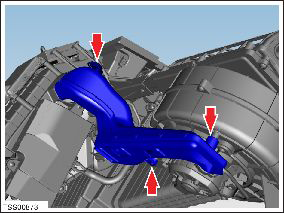
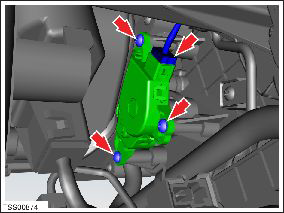
- Disconnect actuator harness connector.
- Remove screws (x3) securing actuator to HVAC assembly (torque 1 Nm).
- Remove temperature control door actuator.
Caution: Take care not to damage component(s).
Installation procedure is the reverse of removal.
READ NEXT:
 Actuator - Defrost (Remove and Replace)
Removal
Remove glove box assembly (refer to procedure)
Disconnect actuator harness connector.
Remove screws (x3) securing defrost door actuator to HVAC
assembly (torque 1 Nm).
Motor - Fan assembly - HVAC (Remove and Replace)
Removal
Power the passenger seat fully rearward for access.
Remove the passenger footwell closing trim (refer to procedure).
Disconnect the fan harness connector and position the
Hose - HVAC - Drain (Remove and Replace)
Removal
Remove the LH closeout extension assembly (refer to procedure).
Note: For vehicles built with the cold weather
package between May 31, 2013 and July 11
SEE MORE:
Strut - Shock Tower to Bulkhead - LH (Remove and Replace)
Removal
Ensure that the wipers are in the off position by rotating the
end of the left-hand steering column lever towards the rear of the
vehicle.
Open the hood to the service position.
Remove both wiper arms (refer to procedure).
Remove the bolts (x2) that secure the LH
200A Fuses - Wall Connector (Remove and Replace) - Removal
Removal
Warning: Only technicians who have been trained in High
Voltage Awareness are permitted to perform this procedure.
Proper personal protective equipment (PPE) and insulating HV
gloves with a minimum rating of class 00 (500V) must be worn any
time a high volta
© 2019-2026 Copyright www.tesms.org
