
Tesla Model S: Ankle Catcher Assembly (Remove and Replace)
Tesla Model S (2012-2026) Service Manual / Body / Ankle Catcher Assembly (Remove and Replace)
Removal
- Remove the front fascia (refer to procedure).
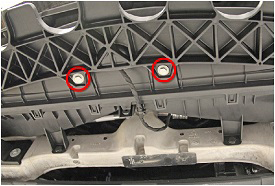
- Remove the bolts (x2) that secure the center of the ankle
catcher to the front ducting (torque 4 Nm).
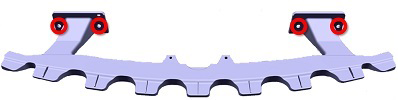
- Remove the bolts (x4) that secure the ankle catcher to the front
bumper carrier (torque 8 Nm).
Note: Components have been removed in this graphic to aid clarity.
Installation procedure is the reverse of removal.
READ NEXT:
 Applique - Fascia - Front - 1st Generation (Remove and Replace)
Note: This procedure describes how to remove and replace
the 1st generation front fascia applique. If the vehicle is equipped
with a 2nd generation front fascia applique, refer to procedure
Applique - Fascia - Front - 2nd Generation (Remove and Install)
Note: This procedure describes how to remove and
install the 2nd generation front fascia applique. If the vehicle is
equipped with a 1st generation front fascia applique, refer to
procedur
Applique - Fascia - Front - 2nd Generation (Remove and Replace)
Note: This procedure describes how to remove and replace
the 2nd generation front fascia applique. If the vehicle is equipped
with a 1st generation front fascia applique, refer to procedure
SEE MORE:
Opening
To open the front trunk, ensure Model S is in Park, and
then do one of the following before pulling the hood
open:
Touch Controls > Frunk on the touchscreen.
Double-click the front trunk button on the key fob.
Touch the front trunk button in the mobile app.
The instrument panel displays w
Canceling and Resuming
To manually cancel Traffic-Aware Cruise Control, press
the brake pedal or press the right scroll wheel on the
steering yoke.
To resume cruising, press the right scroll button.
NOTE: When Traffic-Aware Cruise Control cancels,
Model S does not coast. Instead, regenerative braking
slows down Model
© 2019-2026 Copyright www.tesms.org
