
Tesla Model S: Back Rest Assembly - Seat - 2nd Row - RH (Remove and Install)
Tesla Model S (2012-2026) Service Manual / Seats / Back Rest Assembly - Seat - 2nd Row - RH (Remove and Install)
Removal
- Remove RH rear seat bolster (refer to procedure)
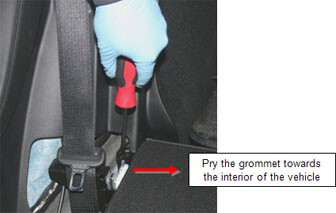
- Use a pry tool to release the grommet that secures the RH 2nd
row backrest.
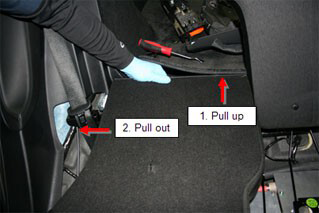
- Pull up on the RH backrest, then pull it outwards to disconnect
it from the LH backrest.
- Remove rear seat back rest assembly.
READ NEXT:
 Back Rest Assembly - 2nd Row - Executive (Remove and Replace)
Removal
Remove the LH and RH lower seat cushions (refer to procedure).
On each side of the vehicle, remove the screw that secures the
closeout panel to the seat frame (to
Assembly - Back Rest - Driver's Seat (Remove and Replace)
Removal
Remove driver's seat assembly (refer to procedure)
Place seat on clean work surface.
Remove screw securing outer side cover to seat (torque 1 Nm).
Frame - Seat Base - 2nd Row Cushion (Remove and Replace)
Removal
Remove the seat cushion (refer to procedure).
Remove the LH rear seat back rest assembly (refer to procedure).
Remove the RH rear seat back rest assembly (refer to procedu
SEE MORE:
Overview
NOTE: Entertainment options vary by market region.
The touchscreen displays the Entertainment screen when you choose any of the
following apps:
Theater: Play various video
streaming services (such as Netflix, YouTube, Hulu, etc.) while parked.
Arcade: Want to game? Depending
on the game, you ma
Mount - Front Drive Unit - LH (Adjust)
Note: This procedure assumes that the RH mount has been
replaced, but that the shim tools cannot be repositioned to verify
proper clearance. If this happens, follow this procedure to adjust
the LH side motor mount.
Release the 2 bolts that secure the 4-way valve bracket to the body.
© 2019-2026 Copyright www.tesms.org
