
Tesla Model S: Cable - Latch - Hood (RWD) (Remove and Replace)
Tesla Model S (2012-2026) Service Manual / Closures / Cable - Latch - Hood (RWD) (Remove and Replace)
Removal
- Remove the hood latch cover (refer to procedure).
- Release the hood release cable hook from the latch assembly.
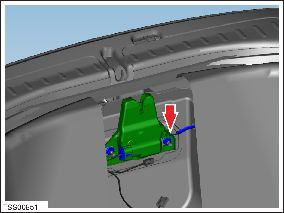
- Peel back the edge of the front trunk carpet for access.
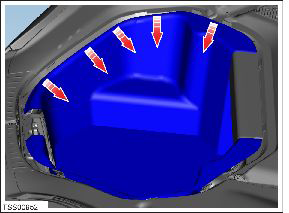
- Depress the clips and disconnect the hood release cable from the slam panel bracket.
- Release the clips (x2) that secure the cable to the body.
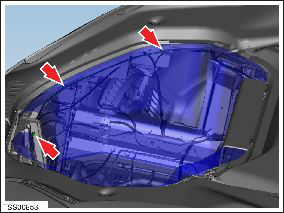
- Remove and discard the clips from the cable.
- Tie a suitable tether to disconnected the end of the hood release cable and tape it for security.
- Open the passenger door.
- Disconnect the lever from the dash.
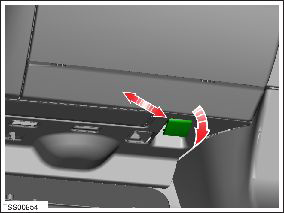
- With assistance, gently pull the cable through the bulkhead
grommet into the passenger footwell.
Caution: Take care not to damage component(s).
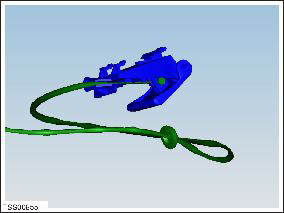
- Ensure that the tether remains in the front trunk.
- Disconnect the cable from the lever.
- Installation procedure is the reverse of removal, except for the following:
- Remove the tether from the hood release cable and connect it to the replacement cable.
READ NEXT:
 Cable - Latch - Hood - LH (Dual Motor) (Remove and Replace)
Removal
Remove the underhood storage unit (refer to procedure).
Release the rear cable from the latch assembly.
Note: If performing this procedure on the
RH side, rele
Actuator - Latch - Hood - LH (Dual Motor) (Remove and Replace)
Removal
Remove the ankle catcher (refer to procedure).
Remove the LH and RH condenser ducts (refer to procedure).
Remove the plastic rivets (x3) that secure the center louver
asse
Gas Strut - Hood - LH (Remove and Replace)
Removal
Open hood.
Support hood in open position.
Release clip securing gas strut to body.
Disconnect gas strut fro
SEE MORE:
TXV Valve - Evaporator (Remove and Replace)
Removal
Recover refrigerant from the vehicle (refer to procedure)
Remove underhood storage unit (refer to procedure)
Remove nut securing pipe retaining plate to evaporator TXV
(torque 22 Nm).
Remove bolt securing A/C pipe bracket to cross-brace (torque 6
Nm).
Changing the Cruising Speed
Roll the right scroll wheel up to increase, or down to
decrease, the set speed. Slowly rolling the scroll wheel
changes the set speed in 1 mph (1 km/h) increments and
quickly rolling the scroll wheel changes the set speed to
the closest 5 mph (5 km/h) increment.
NOTE: It may take a few seconds
© 2019-2026 Copyright www.tesms.org
