
Tesla Model S: Pre-Tensioner - Outboard Lap - 1st Row - LH (Remove and Replace)
Tesla Model S (2012-2026) Service Manual / Safety and Restraint / Pre-Tensioner - Outboard Lap - 1st Row - LH (Remove and Replace)
Removal
- Disconnect 12V power.
- Rear wheel drive (RWD): Refer to procedure.
- Dual Motor: Refer to procedure.
- Use a trim tool to carefully release the anchor bolt cap from
the inboard upper pre-tensioner cover.
.png)
- Remove the bolt that secures the seat belt to the pre-tensioner
(torque 9 Nm).
.png)
- Remove the inboard upper pre-tensioner cover.
- Carefully release the seat belt assembly from the upper pre-tensioner
cover.
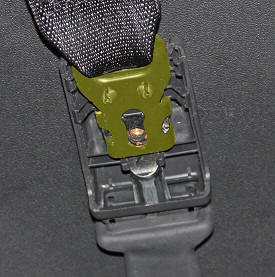
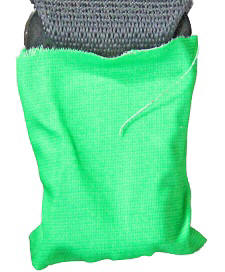
- Wrap the seat belt connector with protective tape to prevent it
from damaging any of the interior.
- Remove the lower B-pillar trim (refer to procedure).
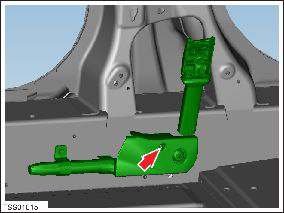
- Remove the screw that secures the seat belt pre-tensioner cover
then remove the cover (torque 9 Nm).
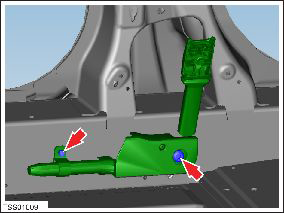
- Remove the bolt that secures the seat belt pre-tensioner support
bracket to the body of the vehicle:
- Model S vehicles built prior to December 8, 2015: Torque 9 Nm.
- Model S vehicles built on December 8, 2015 or later: Torque 5 Nm.
- Remove the bolt that secures the seat belt pre-tensioner to the
body of the vehicle (torque 40 Nm).
- Disconnect the seat belt pre-tensioner connector and harness.
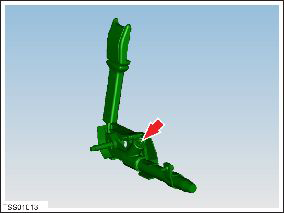
- Remove the seat belt pre-tensioner from the vehicle.
Installation procedure is the reverse of removal.
READ NEXT:
 Pyrotechnic Fuse (Remove and Replace)
Warning: Prior to disconnection of 12 volt power supply,
ensure driver's door glass is in the fully open position. Failure to
follow this instruction could result in vehicle lockout.
Warni
Sensor - Intrusion - Door - Front (Remove and Replace)
Removal
Remove door trim panel (refer to procedure)
Remove screws (x2) securing impact sensor to door (torque 5 Nm).
Disconnect sensor harness connection.
Sensor - Impact - Front (Remove and Replace)
Warning: To avoid personal injury, observe all relevant
safety precautions before removing or testing any SRS components.
Removal
Remove the underhood storage unit:
SEE MORE:
Finisher - Liftgate - Rear Window - Lower (Remove and Replace)
Removal
Inspect the latch cover. If it is a separate trim part, remove
it with a trim tool. If is not a separate part, proceed to step 2.
Remove the liftgate upper trim finisher (refer to procedure).
Remove the
Antenna - GSM - LH (Remove and Replace)
Note: The GSM antenna is a component within the door
mirror assembly. If the GSM antenna develops a fault, the whole
mirror assembly must be replaced.
Removal
Remove the door mirror assembly (refer to procedure).
Remove the door mirror
© 2019-2026 Copyright www.tesms.org
