
Tesla Model S: Hinge - Hood - LH (Remove and Replace)
Tesla Model S (2012-2026) Service Manual / Closures / Hinge - Hood - LH (Remove and Replace)
Removal
- Remove the hood assembly (refer to procedure).
- Mark the installed position of the hinge to the hood.
- Remove the nuts (x2 or x3) that secure the LH hinge to the hood
(torque 24 Nm).
Caution: Protect exterior paint work from possible damage during this procedure.
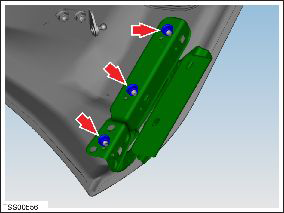
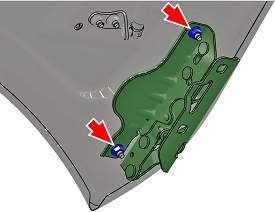
- Remove LH hood hinge.
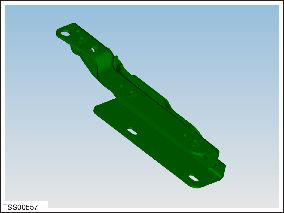
Installation procedure is the reverse of removal, except for the following:
Note: Clean the affected areas before installation.
Caution: Replace all nylon-insert locknuts.
- Install the hood hinge to the previously marked position.
READ NEXT:
 Cable - Latch - Hood (RWD) (Remove and Replace)
Removal
Remove the hood latch cover (refer to procedure).
Release the hood release cable hook from the latch assembly.
Cable - Latch - Hood - LH (Dual Motor) (Remove and Replace)
Removal
Remove the underhood storage unit (refer to procedure).
Release the rear cable from the latch assembly.
Note: If performing this procedure on the
RH side, rele
Actuator - Latch - Hood - LH (Dual Motor) (Remove and Replace)
Removal
Remove the ankle catcher (refer to procedure).
Remove the LH and RH condenser ducts (refer to procedure).
Remove the plastic rivets (x3) that secure the center louver
asse
SEE MORE:
Data Sharing
For quality assurance and to support the continuous
improvement of advanced features such as Autopilot,
your Model S may collect analytics, road segment,
diagnostic, and vehicle usage data and send to Tesla for
analysis. This analysis helps Tesla improve products and
services by learning from t
Battery - Auxiliary - 12V (RHD) (Remove and Replace)
Warning: If the 12V power supply is disconnected, do
not attempt to open any doors with door glass in closed position.
Failure to follow this instruction could result in door glass
shatter.
Note: Before disconnecting the 12V power supply,
ensure that the driver's door window
© 2019-2026 Copyright www.tesms.org
