
Tesla Model S: Master Charger - RH - 1st Generation (Remove and Replace)
Note: This procedure describes how to remove and install the 1st generation master charger. If the vehicle is equipped with a 2nd generation master charger, refer to procedure 44102202 (refer to procedure).
Warning: Only technicians who have been trained in High Voltage Awareness are permitted to perform this procedure. Proper personal protective equipment (PPE) and insulating HV gloves with a minimum rating of class 00 (500V) must be worn any time a high voltage cable is handled. Refer to Tech Note TN-15-92-003, "High Voltage Awareness Care Points" for additional safety information.
Warning: To avoid personal injury, eye protection must be worn while using compressed air.
Removal
Note: The slave charger is not installed in the vehicle unless it was requested as an option. The graphics may show both options, Master and Slave chargers, during this procedure.
- Remove the HV junction box (refer to procedure) .
- Disconnect the harness.
- Peel back the carpet for access to the bolts.
- Remove the nuts (x4) that secure the charger to the floor panel
(torque 6.5 Nm).
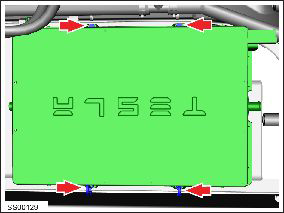
- Remove the bolt that secures the ground strap to the charger casing (torque 6.5 Nm).
- Position the ground strap aside.
- Clamp both hoses as close to the charger as possible to minimize
coolant loss. Release the hose clips (x2).
Note: Place suitable absorbent material around the affected area to absorb any possible fluid spillage.
Caution: Plug component open ports and disconnected hoses to prevent coolant loss.
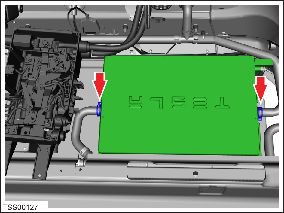
- Disconnect both coolant hoses, tilt the charger ports upward, and plug immediately.
- Remove the charger.
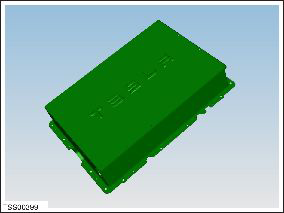
- If the charger is being shipped or stored, allow the coolant to drain from the charger, then use compressed air lightly to blow out any remaining coolant.
Caution: Do not exceed 25 PSI when using compressed air to blow out any remaining coolant.
InstallationInstallation procedure is the reverse of removal, except for the following:
- Refill and bleed the cooling system (refer to procedure) .
- If either charger is being replaced, it will be necessary to update the vehicle firmware using Tesla Diagnostic Tool.
-
Use Toolbox to update or redeploy the firmware:
- If the vehicle is not running the latest firmware, run the "Vehicle Firmware Update" procedure.
- If the vehicle is running the latest firmware, run the "Firmware Redeploy" procedure.
- If possible, charge the vehicle at above 40 A for several minutes and verify that there are no alerts.
READ NEXT:
 Master Charger - RH - 2nd Generation (Remove and Replace) - Removal
Note: This procedure describes how to remove and install
the 2nd generation master charger. If the vehicle is equipped with a
1st generation master charger, refer to procedure 44100202 (refer
Installation, Configuration, and Coolant Purge
Fully clean the area before installing the new charger.
Note: Have an assistant hold up the front of the HVJB
20-30 mm until the coolant hoses have been secured to the
charger.
SEE MORE:
Subframe Assembly - Front (Remove and Replace)
Removal
Remove front subframe assembly for access
(refer to procedure)
Remove and discard the bolts (x2) securing
steering rack assembly to subframe (torque 175 Nm).
Caution: Replace all
Patchbolt(s).
Caution:
Ensure that the bolts ar
Identification Numbers
Vehicle Identification Number (VIN)
VIN Locations
The Vehicle Identification Number (VIN) is visible in 3 locations:
The bottom corner of the driver's side of the windshield
On the driver's side door jamb
Vehicles built before September 2015: On the front crossmember,
benea
