
Tesla Model S: Lamp - Brake - High Mounted (Remove and Replace)
Tesla Model S (2012-2026) Service Manual / Electrical / Lamp - Brake - High Mounted (Remove and Replace)
Removal
- Remove liftgate glazing (refer to procedure)
- Position liftgate glazing on suitable glazing stand.
- Note installed position of Central High Mounted Stop Lamp (CHMSL).
- Using a suitable tool cut CHMSL from liftgate glazing. Warning: To avoid personal injury, eye protection must be worn when performing this operation. Caution: Take care not to damage component(s).
- Remove CHMSL.
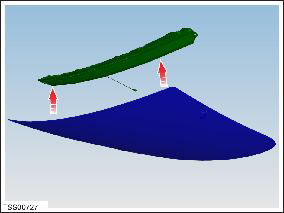
- Installation procedure is the reverse of removal, except for the following: Note: Clean the affected areas before installation.
- If CHMSL is to be re-used, clean residual sealant from mating face.
- Clean residual sealant from glass.
- Spirit wipe and thoroughly clean glass adjacent to CHMSL.
- Apply height setting blocks to glass and check CHMSL is correctly located.
- Remove CHMSL and apply suitable sealant to component mating faces
- Install CHMSL to installed position and push fully home.
- Wipe away access sealant.
- Apply adhesive tape to retain CHMSL and allow adhesive to cure.
READ NEXT:
 Light - License Plate (Remove and Replace)
Removal
Remove the screws (x5) that secure the rear applique bracket to
the tailgate.
Remove the rear applique bracket.
Light - Fog/Reverse - Rear - LH (Remove and Replace)
Removal
Remove the liftgate applique (refer to procedure).
Remove the tailgate lower finisher (refer to procedure).
Release the watershield for access to the fog/reverse lamp.
Lamp - Side Repeater - Front - LH (Remove and Replace)
Removal
Using a suitable tool carefully release fixing lugs (x2)
securing side repeater to front fender. NOTE: Wheel arch liner
removed for clarity.
Caution:
SEE MORE:
Brake Pads - Park Brake - Burnishing
Warning: Be sure to comply
with all local traffic safety laws and only perform such maneuvers in a
suitable location such as a nonresidential side street with little to no
traffic.
Caution: Do not perform this
procedure on a vehicle that has new rotors unless they have gone through
a
Pivot Lock - Seat back - 2nd Row Seat - RH (Remove and Replace)
Removal
Remove rear seat back rest assembly (refer to procedure)
Remove E-clip securing pivot lock.
Slide pivot lock from backrest frame.
Installation
Installation procedure is the reverse
© 2019-2026 Copyright www.tesms.org
