
Tesla Model S: Latch - Door - Rear - LH (Remove and Replace)
Tesla Model S (2012-2026) Service Manual / Closures / Latch - Door - Rear - LH (Remove and Replace)
Removal
- Remove the rear seat cushion frame (refer to procedure).
- Remove the rear sill trim panel (refer to procedure).
- Release the carpet and sound insulation from the rear seat
mounting cross member to gain access to the latch manual release
lever and cable.
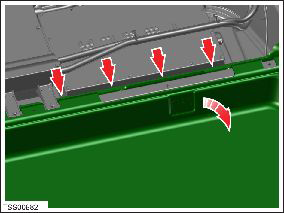
- Release the clip from the cross member and feed the cable
through the opening.
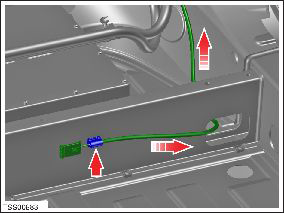
- Remove the screws (x2) that secure the latch to the C-Pillar
(torque 10 Nm).
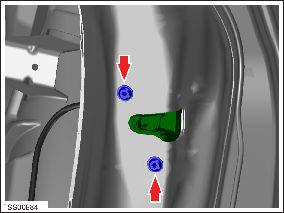
- From inside the vehicle, disconnect the latch wiring, release
the latch from the C-Pillar, then remove it from the opening.
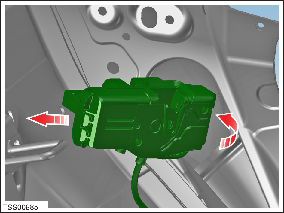
Installation procedure is the reverse of removal.
READ NEXT:
 Striker - Door - Front - LH (Remove and Replace)
Removal
Open door.
Remove countersunk screws (x2) securing striker plate to 'B'
pillar (torque 22 Nm).
Note: Note installed position of components before
removal.
Striker - Door - Rear - LH (Remove and Replace)
Removal
Open door.
Remove countersunk screws (x2) securing striker plate to rear
door (torque 22 Nm).
Note: Note installed position of components before
removal.
Handle - Interior Release - Door - Front - LH (Remove and Replace)
Removal
Remove front door trim panel (refer to procedure)
Release clips and remove door pad finisher.
Caution: Take care not to damage component(s).
SEE MORE:
Module - TPMS - Baolong (Remove and Replace)
Warning: If the vehicle has air suspension, activate "Jack"
mode on the touchscreen before raising and supporting the vehicle.
Removal
Raise and support the vehicle (refer to procedure).
Warning: Do not work on an incorrectly supported vehicle.
Trim - 'B' Post - Upper - LH (Remove and Install)
Removal
Remove the LH lower 'B' post trim (refer to procedure).
Carefully release the clips (x4) that secure the 'B' post upper
trim to the body by gently pulling the lower edge away from the body
and releasing the top alignment dowel.
Caution: Take car
© 2019-2026 Copyright www.tesms.org
