
Tesla Model S: LED - Door - Exterior Handle - Front - LH (Remove and Replace)
Tesla Model S (2012-2026) Service Manual / Closures / LED - Door - Exterior Handle - Front - LH (Remove and Replace)
Removal
- Remove backplate grip (refer to procedure)
- Disconnect LED wiring and remove from door grip.
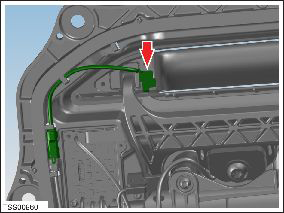
- Install LED and connect wiring.
- Install backplate grip.
LED - Door - Exterior Handle - Rear - LH (Remove and Replace)
Removal- Remove backplate grip (refer to procedure)
- Disconnect LED wiring and remove from door grip.
- Install LED and connect wiring.
- Install backplate grip.
READ NEXT:
 Motor - Door - Exterior Handle - Front - LH (Remove and Replace)
Removal
Remove door handle for access (refer to procedure)
Position handle assembly on a soft working surface.
Remove door handle rear seal.
Release motor harness connector.
R
Motor - Door - Exterior Handle - Rear - LH (Remove and Replace)
Removal
Remove door handle for access (refer to procedure)
Position handle assembly on a soft working surface.
Remove door handle rear seal.
Remove cable ties securing door pressu
PCB - Door - Exterior Handle - Front - LH (Remove and Replace)
Removal
Remove fork and control link for acces (refer to procedure)
Remove screws (x3) securing PCB to housing (torque 1.5 Nm).
SEE MORE:
Controlling Audible Feedback
You can use Park Assist with or without audible
feedback. To turn chimes on or off, touch Controls >
Safety > Park Assist Chimes.
To mute the chimes temporarily, touch the speaker icon
in the bottom corner of the Park Assist view. The chimes
are muted until you shift or drive over 5 mph (
Fascia Assembly - Front (Remove and Install)
Warning: If the vehicle has air suspension, activate "Jack"
mode on the touchscreen before raising and supporting the vehicle.
Removal
Remove the front underhood apron (refer to procedure).
Remove the plastic rivets (x8) that secure the undershield to
the chin spoiler.
© 2019-2026 Copyright www.tesms.org
