
Tesla Model S: Module - TPMS - Continental (Remove and Replace)
Tesla Model S (2012-2026) Service Manual / Electrical / Module - TPMS - Continental (Remove and Replace)
Removal
- Remove RH rear seat bolster (refer to procedure).
- Remove the 2nd row seat cushion (refer to procedure).
- Release the lower section of the RH sill panel to access the
TPMS ECU.
Caution: Do not remove the entire trim panel.
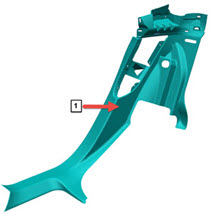
1 Location of TPMS ECU. - Release the harness from the base of the TPMS ECU.
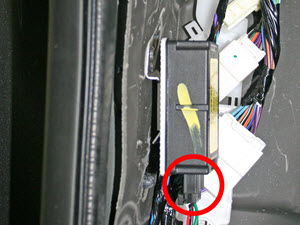
- Slide the ECU downwards to remove it from the metal bracket.
Installation procedure is the reverse of removal, except for the following:
Caution: Replace any broken clips.
Perform the TPMS sensor ID learn procedure (refer to procedure)
Perform a road test.
READ NEXT:
 Module - HomeLink Transmitter (Remove and Replace)
Removal
Remove the front fascia (refer to procedure).
Disconnect the HomeLink transmitter module from the wiring
harness.
Release the clips (x2) that secure the HomeLink transmitt
Sensor - Parking Distance - Front - Each (Remove and Replace)
Removal
Remove the front fascia assembly (refer to procedure).
Set the fascia assembly on a flat, clean surface.
Disconnect the parking distance sensor connector.
Sensor - Parking Distance - Rear - Each (Remove and Replace)
Removal
Remove the rear fascia assembly (refer to procedure).
Set the fascia assembly on a flat, clean surface.
Disconnect the parking distance sensor connector.
SEE MORE:
HOLD State
When following a vehicle, Traffic-Aware Cruise Control
remains active at low speeds, even when Model S comes
to a full stop. When the vehicle is moving again, Traffic-
Aware Cruise Control resumes operating at the set
speed. However, under the following circumstances,
Traffic-Aware Cruise Contro
Ensuring Accurate Occupant
Classification
To help ensure an occupant in the front passenger seat
can be accurately classified, the passenger must:
Wear a seat belt.
Sit upright on the center of the seat cushion, with
shoulders resting against the seat back and legs
extended comfortably in front with feet on the floor.
See Examples
© 2019-2026 Copyright www.tesms.org
