
Tesla Model S: Sensor - Parking Distance - Front - Each (Remove and Replace)
Tesla Model S (2012-2026) Service Manual / Electrical / Sensor - Parking Distance - Front - Each (Remove and Replace)
Removal
- Remove the front fascia assembly (refer to procedure).
- Set the fascia assembly on a flat, clean surface.
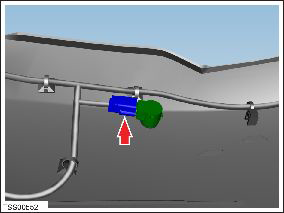
- Disconnect the parking distance sensor connector.
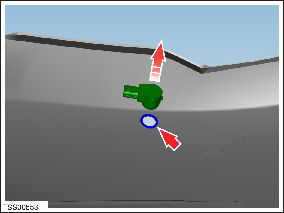
- Carefully release the parking distance sensor from the fascia
retaining ring.
Installation procedure is the reverse of removal.
READ NEXT:
 Sensor - Parking Distance - Rear - Each (Remove and Replace)
Removal
Remove the rear fascia assembly (refer to procedure).
Set the fascia assembly on a flat, clean surface.
Disconnect the parking distance sensor connector.
Sensor - Radar - Front (Remove and Replace)
Removal
Remove the front fascia (refer to procedure).
Remove the radar sensor gasket.
Note: The flaps on each side of the radar sensor
gasket are secured by double-sided
SEE MORE:
Shift Using the Center Console
In addition to manually shifting on the touchscreen, you
can shift by pressing P, R, N or D located on the center
console. In most situations, these buttons are not
available until you press one of the buttons to activate it.
When active, the LEDs associated with each button
illuminate and when
Assembly - Instrument Panel Lower - RH (Remove and Replace)
Removal
Remove the RH instrument panel side cover assembly (refer to
procedure).
Note: LH panel is illustrated; RH removal is
identical.
Using a suitable tool, release the clips (x13) that secure the
trim to the dash substrate.
© 2019-2026 Copyright www.tesms.org
