
Tesla Model S: Skid Bar - Front Subframe (Remove and Replace)
Tesla Model S (2012-2026) Service Manual / Chassis / Skid Bar - Front Subframe (Remove and Replace)
Removal
- Remove the front aero shield panel (refer to procedure).
-
Remove and discard the inner bolts (x2) that
secure the skid bar to the front subframe (10 Nm).
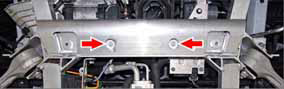
-
If equipped, remove and discard the outer bolts
(x2) that secure the skid bar to the front subframe (10 Nm).

- Remove the skid bar.
Installation procedure is the reverse of removal.
Caution: Use new bolts to install the skid bar. Do not reuse any bolts.
READ NEXT:
 Bash Plate - Front - Stamping (Remove and Replace)
Removal
Remove the front aero shield panel
(refer to procedure).
Remove the bash plate extrusion
(refer to procedure).
Remove and discard the bolts (x2), shoulder
Bash Plate - Front - Extrusion (Remove and Replace)
Removal
Raise and support the vehicle
(refer to procedure).
Remove and discard the bolts (x2) that secure
the bash plate extrusion to the front subframe (10 Nm).
SEE MORE:
Brake Hose - Flexible - Front - LH (Remove and Replace)
Warning: If the vehicle
has air suspension, activate "Jack" mode on the touchscreen before
raising and supporting the vehicle.
Removal
Remove the front LH wheel
(refer to procedure).
Clean the areas that surround the connections
at each end of the brake h
Seat Belt Assembly - 1st Row - LH (Remove and Replace)
Warning: If the 12V power supply is disconnected, do
not attempt to open any doors with door glass in closed
position. Failure to follow this instruction could result in
door glass shatter.
Note: Before disconnecting the 12V power supply,
ensure that the driver's door window
© 2019-2026 Copyright www.tesms.org
