
Tesla Model S: Steering Wheel (Remove and Replace)
Tesla Model S (2012-2026) Service Manual / Steering / Steering Wheel (Remove and Replace)
Removal
- Remove the driver's air bag (refer to procedure).
- Position the wheels straight ahead. Mark the steering wheel relative position to the column.
- Remove and discard the bolt that secures the steering wheel to the column (torque 80 Nm).
- Remove the steering wheel.
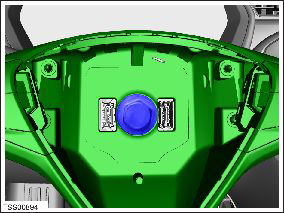
- Tape the clockspring cassette to prevent rotation.
Installation procedure is the reverse of removal, except for the following:
- Remove the tape and ensure that the spring loaded pin is in the clockspring slot when installing steering wheel.
- Install a new mounting bolt.
READ NEXT:
 Steering Column (Remove and Replace)
Removal
Ensure that the front road wheels are in a straight ahead
position.
Remove the driver's side lower dash trim (refer to procedure).
Remove the steering controller modul
Brake Rotor - Front - LH (Remove and Replace)
Warning: If the vehicle
has air suspension, activate "Jack" mode on the touchscreen before
raising and supporting the vehicle.
Special tool(s) required for this procedure:
SEE MORE:
Guidelines for Seating Children
Your Model S seat belts are designed for adults and larger children. You must
restrain infants and small children in
the rear seats only, and you must use a suitable child safety seat appropriate
for the child's age, weight, and size.
WARNING: Never seat a child in the front row passenger seat,
Finisher - Liftgate - Rear Window - Side - LH (Remove and Replace)
Removal
Remove the upper rear window finisher (refer to procedure).
Release the clips (x3) and remove the tailgate side finisher.
Caution: Take care not to damage component(s).
Note: Components have been removed in this graphic
to aid clarity.
© 2019-2026 Copyright www.tesms.org
