
Tesla Model S: Suspension - Front - Check Torque
- Remove the front wheels (refer to procedure).
Check the tightening torque of the following fasteners on both sides of the vehicle:
- Tie rod end to the knuckle (torque 103 Nm).
Caution: To prevent ball joint damage, always hold the ball joint pin with a wrench while loosening or tightening the lock nut.
.png)
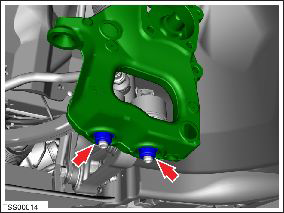
- Lower control arm ball joints to the knuckle (torque 195 Nm).
Caution: To prevent ball joint damage, always hold the ball joint pin with a wrench while loosening or tightening the lock nut.
- Reinstall the front wheels (torque 175 Nm).
- Place the vehicle on a 4-post lift (refer to procedure). Caution: Only fully tighten suspension nuts and bolts when the vehicle is on a 4-post lift and the suspension is in the ride height position.
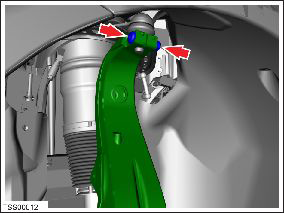
- Upper control arm ball joint to the knuckle (torque 60 Nm).
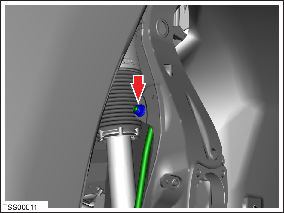
- Sway bar link to the knuckle (torque 70 Nm).
Caution: To prevent ball joint damage, always hold the ball joint pin with a wrench while loosening or tightening the lock nut.
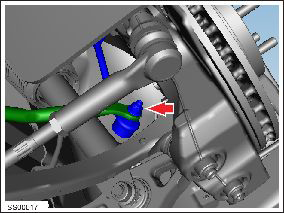
- Sway bar to the sway bar link (torque 70 Nm).
Caution: To prevent ball joint damage, always hold the ball joint pin with a wrench while loosening or tightening the lock nut.
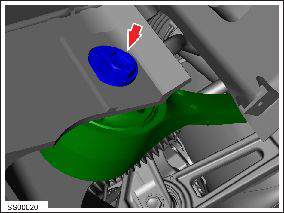
- Forward lower control arm to the subframe (torque 130 Nm).
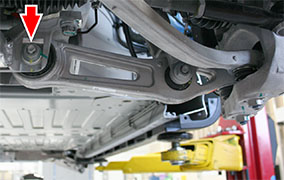
- Rear lower control arm to the subframe (torque 130 Nm).
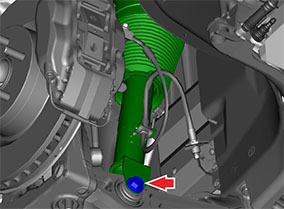
- Shock absorber to the lower control arm (torque 140 Nm).
- Remove the vehicle from the 4-post lift.
READ NEXT:
 Knuckle - Suspension - Front - LH (Remove and Replace)
Warning: If the vehicle has air suspension, activate "Jack"
mode on the touchscreen before raising and supporting the vehicle.
Removal
Remove the front hub (refer to procedure).
Hub - Front - LH (Remove and Replace)
Special tool(s) required for this procedure:
Supplier
Part Number
Description
Tesla
1062500-00-A
Magnetic F
Link - Sway Bar - Front - LH (Remove and Replace)
Warning: If the vehicle has air suspension,
activate "Jack" mode on the touchscreen before raising and
supporting the vehicle.
Removal
Loosen the front LH lug nuts (torque 175 Nm
SEE MORE:
Auto Opening and Closing
To operate a HomeLink device without using the
touchscreen, you can automate the device to open as
you approach, and close as you drive away:
1. Touch the HomeLink icon at the top of the Controls
screen, then choose the device you want to
automate.
2. Select the Auto-open when arriving checkbox
Slave Charger - LH - 1st Generation (Remove and Replace)
Note: This procedure describes how to remove and install
the 1st generation slave charger. If the vehicle is equipped with a
2nd generation slave charger, refer to procedure 44102102 (refer to
procedure).
Warning: Only technicians who have been trained in High
Voltage Awareness
